
Firmware analysis, malware triage, and embedded systems reverse engineering often require extracting files from nested container formats: TAR archives inside GZIP files, encrypted firmware wrapped in multiple compression layers, or password-protected ZIPs containing “infected” malware.
Manually peeling each layer with separate tools gets old fast.
Binary Ninja’s Container Transform system automates this workflow, handling detection, extraction, password management, and multi-layer nesting while preserving the structure and provenance of each stage.
The Nested Binary Challenge
Consider analyzing an Apple firmware update:
firmware.img4 (IMG4 container)
  └─ LZFSE compressed payload
      └─ Mach-O kernel
Traditionally you would:
- Recognize the IMG4 format
- Extract the payload
- Identify and decompress LZFSE
- Finally load the Mach-O
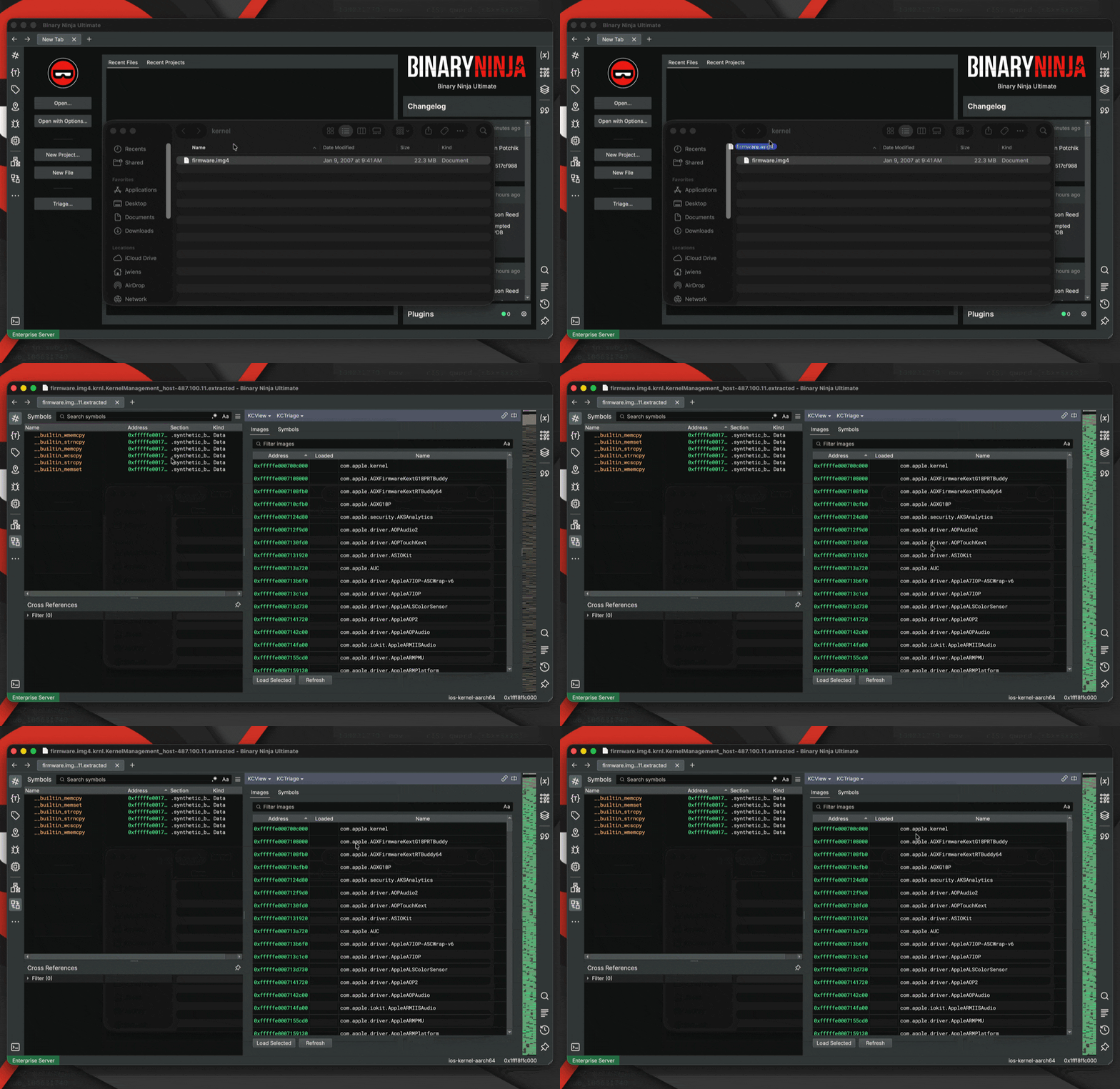
With Container Transforms, this entire chain resolves automatically during file load. Here’s the end result of this feature in action:
The Real Problem: Representation
This system began with a narrower feature: support for memory regions that store decoded data.
The initial impetus for this was performance-related (GitHub issue #7234). Decoded data flowing through the Undo buffer caused regressions because that system was designed for small user-driven edits, not large, derived byte streams.
But the deeper issue was not performance. It was representation itself.
Decoded data has:
- Provenance: how it was produced
- Structure: which container or encoding it came from
- Multiplicity: one input may produce many outputs
Flattening derived data into a linear memory view discards that information.
What was missing was a proper way to model derived artifacts: data that exists because it was decoded, decompressed, or extracted from something else, possibly across multiple stages.
The Container Transform system models each step as a contextual transformation instead of mutating data in place. The result is a navigable tree of derived artifacts that preserves structure, metadata, and history without special cases.
Architectural Direction
We considered several ways this could have been implemented:
- A completely new subsystem for extracted data
- Representing each stage as a
BinaryView - Extending the existing Transform system
Building a parallel subsystem could add unnecessary complexity. Modeling each stage as a BinaryView would have blurred the line between representation and analysis. A BinaryView implies analyzable program state, lifecycle semantics, and ownership that do not apply to intermediate decoding stages.
Instead, we leveraged our existing Transform system and extended it with explicit contextual representation. Transforms now produce context, not just bytes. That distinction enables nested containers, multi-output transforms, automatic and interactive workflows, and a clean separation between extraction and analysis.
What Are Container Transforms?
Container transforms are specialized transforms that decode structured formats. Unlike simple encodings (Base64, Hex), container transforms can:
- Auto-detect formats using magic bytes or other signatures
- Extract multiple outputs from a single input
- Handle passwords and encryption
- Chain across nested formats
- Preserve provenance information
Mental Model: Trees, Not Pipelines
graph TD
    A["archive.tar.gz"] -->|Gzip| B["archive.tar"]
    B -->|Tar| C["README.md"]
    B -->|Tar| D["firmware.img4"]
    B -->|Tar| E["config.json"]
    D -->|IMG4| F["LZFSE payload"]
    F -->|LZFSE| G["Mach-O kernel"]
Container extraction forms a tree rather than a linear pipeline. Each node represents a transformation step; children represent derived artifacts. You can inspect intermediate layers instead of interacting only with a flattened final result.
Binary Ninja ships with detection-enabled transforms for:
- Compression: Gzip, Zlib, Bzip2, LZMA, LZ4 (Frame), Zstd, XZ, LZFSE
- Archives: Zip, Tar, CPIO, AR, CaRT
- Binary Containers: IMG4, Universal (Fat Mach-O)
- Firmware Containers: UImage, FIT, TRX
- Disk Images: DMG
- Text Encodings: IntelHex, SRec, TiTxt
>>> [x.name for x in Transform if getattr(x, "supports_detection", False)]
['Gzip', 'Zlib', 'Bzip2', 'LZMA', 'LZ4Frame', 'Zstd', 'XZ', 'Zip', 'CaRT', 'Tar', 'AR', 'CPIO', 'DMG', 'UImage', 'FIT', 'TRX', 'IntelHex', 'SRec', 'TiTxt', 'IMG4', 'LZFSE', 'Universal']
Other Transforms
The transforms listed above support automatic detection, meaning Binary Ninja can recognize the format and incorporate it into the container resolution tree during file loading.
Binary Ninja also provides many additional transforms that are not detection-enabled. These transforms can still be applied manually but are not automatically considered during container discovery.
Common examples include:
- Raw compression primitives (e.g.,
Deflate,LZ4Block,LZF) - Encodings (
Base64,HexDump,RawHex) - Text / language representations (
CArray,RustArray,IntList) - Cryptographic transforms (
AES,DES,RC4, etc.) - Simple reversible transforms (
XOR,ROL, arithmetic transforms)
These transforms typically require parameters, lack reliable file signatures, or would otherwise produce too many false positives if attempted automatically.
They remain accessible through the Transform system and can be applied programmatically:
Transform["Base64"].decode(data)
Transform["Deflate"].decode(data)
Transform["XOR"].decode(data, {"key": b"\x42"})
This design keeps automatic container discovery reliable while still exposing the full transform toolkit for manual analysis workflows.
Invocation Model
Container transforms participate directly in the standard file loading pipeline, both in the UI and through the load() API. When a file is opened, Binary Ninja evaluates whether the input represents a container and recursively resolves any nested transforms.
The process consists of four stages:
- Detection identifies container formats applicable to the input.
- Transform Resolution applies matching transforms and recursively evaluates their outputs.
- Context Tree Construction builds a transformation context tree representing all discovered extraction paths.
- Context Selection chooses a final derived artifact for analysis.
This model allows Binary Ninja to transparently handle arbitrarily nested formats such as compressed archives, firmware containers, or multi-architecture binaries while preserving the full provenance of each transformation step.
Automatic vs Prompted Resolution
Container resolution may complete automatically or require user input depending on the available choices and required parameters.
-
Automatic resolution occurs when there is exactly one valid extraction path and no additional parameters (such as passwords) are required. In this case, Binary Ninja opens the derived artifact directly.
-
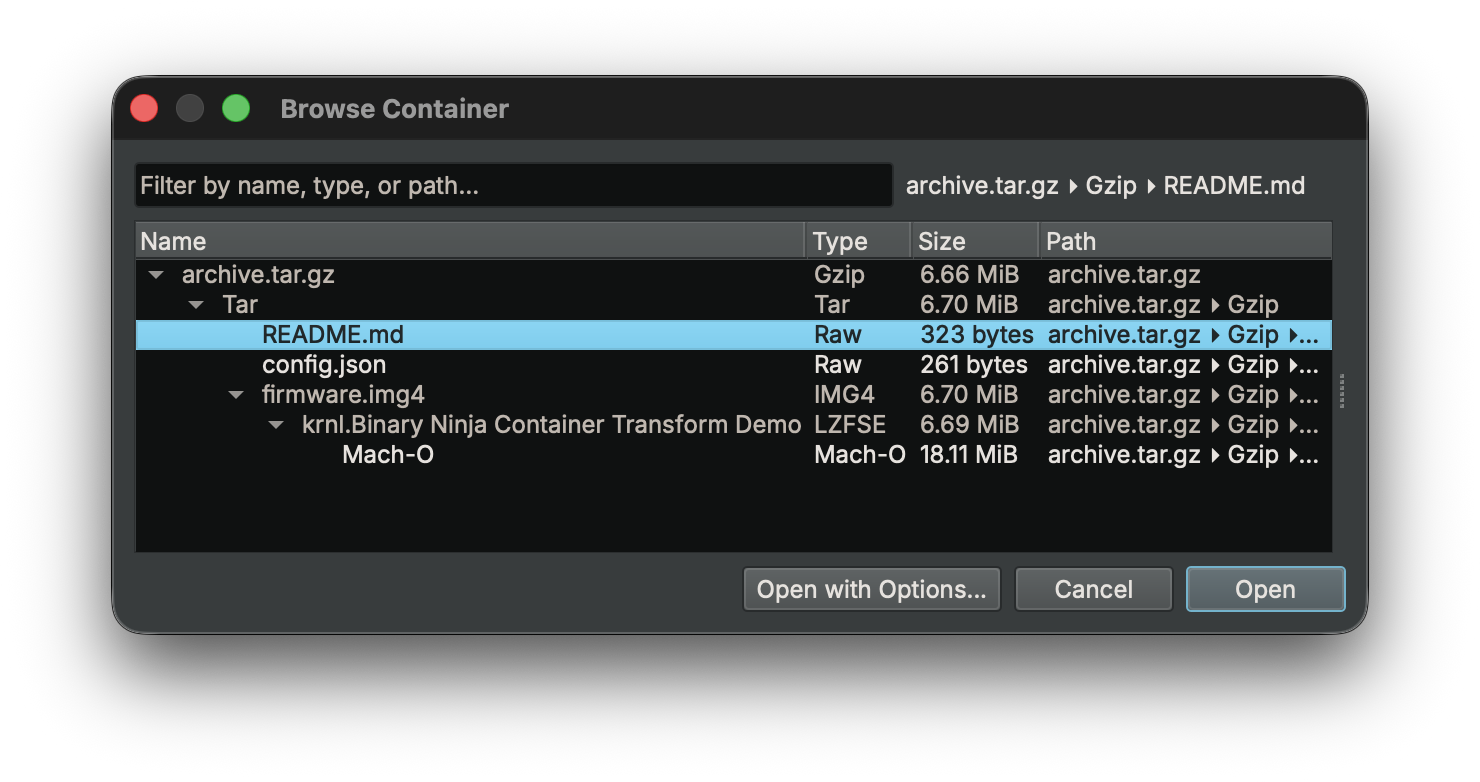
Prompted resolution occurs when multiple candidate artifacts exist or when parameters must be provided. The Container Browser presents the available options and allows the user to select the desired artifact or provide required inputs.
Both resolution modes operate on the same underlying context tree.
The Container Browser also remembers previous selections to streamline repeated workflows. Preferences are cached both per container type and per specific file, allowing Binary Ninja to automatically default to the previously chosen entry when reopening similar containers or the same file again.
Configuration
Container behavior can be adjusted through several settings that control how container detection and resolution occur.
-
files.container.modeControls how container layers are discovered during file loading.- Disabled: open the input file without applying container transforms.
- Full (DEFAULT): discover all possible extraction paths before prompting for selection.
- Interactive: resolve container layers step-by-step, prompting the user at each stage.
-
files.container.autoOpenDetermines whether a single unambiguous extraction path opens automatically or still requires confirmation. Defaults toTrue. -
files.container.defaultPasswordsProvides a list of passwords to attempt automatically when opening password-protected containers. Passwords are tried in order before prompting the user. The default setting is:["infected","password","123456","admin","test","secret","flare","hackthebox","crackmes.de","crackmes.one"] -
files.container.excludedTransformsSpecifies container transforms that should be ignored during automatic detection. Files requiring those transforms will fall back to the standard BinaryView loading path. This can also be overridden per session through load options. Defaults to an empty list.
These settings modify workflow behavior without changing the underlying container resolution model. For example, malware analysts may prefer fully automatic unwrapping with a predefined password list, while users exploring unfamiliar firmware images may prefer step-by-step resolution at each container layer.
For complete settings documentation, see the Container Settings Reference.
The Transform API
First, let’s check out an example using the structure we showed above, then we’ll talk about the components that make it up:
from binaryninja import TransformSession, load

# Stages 1-3: Detection, transform resolution, and context tree construction
session = TransformSession("archive.tar.gz")
session.process()

# Walk the resolved context tree
def walk(ctx, depth=0):
    label = ctx.transform_name or ctx.filename or "root"
    print(f"{'  ' * depth}{label}  ({ctx.child_count} children)")
    for child in ctx.children:
        walk(child, depth + 1)

walk(session.root_context)
# Gzip  (1 children)
#   Tar  (3 children)
#     README.md  (0 children)
#     config.json  (0 children)
#     IMG4  (1 children)
#       LZFSE  (1 children)
#         extracted  (0 children)

# Stage 4: Find the deepest leaf and load it
def find_leaf(ctx):
    if ctx.is_leaf:
        return ctx
    return find_leaf(ctx.children[-1])

leaf = find_leaf(session.root_context)
session.set_selected_contexts(leaf)

with load(leaf.input) as bv:
    print(bv.file.virtual_path)
    # Gzip(.../archive.tar.gz)::Tar()::IMG4(firmware.img4)::LZFSE(krnl...)::extracted
    print(bv.view_type)
    # Mach-O
The system is built on three core types:
Transform: capabilityTransformContext: representationTransformSession: orchestration
Transform: Capability
A Transform defines what can decode what. Key properties:
supports_detection: can the transform auto-select for a given input?supports_context: can it operate in context-aware mode for multi-output extraction?parameters: additional inputs required (encryption keys, passwords, etc.)
# Enumerate all transforms
list(Transform)

# Look up a transform by name
zlib = Transform["Zlib"]
Simple transforms operate directly on bytes:
sha512 = Transform["SHA512"]
rawhex = Transform["RawHex"]
rawhex.encode(sha512.encode("test string"))
Some transforms require parameters:
xor = Transform["XOR"]
xor.encode(b"Original Data", {"key": b"XORKEY"})
For container formats, the important entry point is decode_with_context, which allows a transform to enumerate files, request user selection, and produce extracted child contexts.
TransformContext: Representation
A TransformContext is a node in the extraction tree. It captures:
- An input
BinaryViewthat represents the bytes at this stage (context.input) - The name of the transform that produced the data (
context.transform_name), which can also be set manually viaset_transform_name()to specify a transform for non-auto-detected formats - Transform parameters such as passwords or keys
- Metadata associated with the transformation (
context.metadata_obj) - Extraction and transform status, including structured result codes and human-readable messages
- Parent and child relationships that define the container hierarchy
Together these fields preserve the provenance of derived artifacts and make the container hierarchy explicit.
Execution Model
Container transforms operate in two phases:
- Discovery: the transform enumerates available artifacts, populates
available_files, and returnsFalseto request user selection. - Extraction: the transform processes
requested_files, creates child contexts for each extracted artifact, and returnsTruewhen extraction is complete.
Context Metadata
Each TransformContext can also carry format-specific metadata through its metadata_obj property. This allows transforms to preserve structured information about the extraction process beyond the raw bytes.
Examples include archive attributes, compression details, encryption parameters, timestamps, or other format-specific information that may be useful to downstream transforms or analysis plugins.
While most current container transforms focus primarily on producing extracted artifacts, the metadata mechanism provides an extensibility point for richer communication between transformation stages when needed.
TransformSession: Orchestration
TransformSession drives the extraction workflow over the TransformContext tree using the available Transforms.
It coordinates container detection, transform execution, and context selection as nested containers are processed. The session advances extraction automatically when possible and pauses when user input or artifact selection is required.
A session is responsible for:
- Detecting and applying transforms for each context
- Traversing nested containers and multi-stage formats
- Constructing and maintaining the context tree
- Managing user selection and transform parameters
- Selecting one or more final contexts for analysis
In effect, TransformSession acts as the policy layer of the container system, controlling how extraction progresses and which derived artifacts ultimately become inputs to analysis.
The session API is intentionally small and focused. The most important operations are:
current_view, the currentBinaryViewfor this sessioncurrent_context, the currentTransformContextbeing processedprocess(), which advances the extraction workflow and returnsTruewhen processing is completeprocess_from(context), which resumes processing from a specific context after input or selection has been providedset_selected_contexts(...), which marks one or more contexts as the intended outputs
Filename Resolution
Container extraction introduces multiple naming layers that serve different roles:
| Property | Role | Description |
|---|---|---|
filename |
Storage | Physical path on disk (for example the .bndb path when working with a saved database) |
original_filename |
Source | Path of the original binary that produced the current view |
virtual_path |
Provenance | Provenance chain produced by the container/transform system (defaults to filename for non-container files) |
display_name |
Presentation | Synthesized path used for UI display (tab titles, save dialogs, etc.; project-aware naming is handled in the UI layer) |
For files opened directly from disk (without container transforms), these values are typically identical. For extracted artifacts, they diverge:
# ZIP containing file3.bin, nested inside a .tar.xz
bv.file.virtual_path    # → 'XZ(/path/to/archive.tar.xz)::Tar()::file3.bin'
bv.file.display_name    # → '/path/to/archive/file3.bin'

# IMG4 firmware component
bv.file.virtual_path    # → 'IMG4(/path/to/firmware.v59)::LZFSE(krnl.1)::extracted'
bv.file.display_name    # → '/path/to/firmware.v59.krnl.1.extracted'
virtual_path preserves the provenance chain describing how the artifact was produced.
display_name provides a concise label suitable for UI presentation.
Example: Nested Archive
from binaryninja import TransformSession, load

# Create a session for the nested archive
session = TransformSession("backup.tar.gz")

# Process the entire extraction chain
if session.process(): # Returns True if extraction completed successfully
    # Select and load the final extracted file
    session.set_selected_contexts(session.current_context)

    with load(session.current_view) as bv:
        print(bv.file.virtual_path)
        # 'Gzip(/path/to/backup.tar.gz)::Tar()::data.bin::extracted'
Example: Manual Transform Selection
Some encodings (such as Base64) do not have reliable signatures for automatic detection. Because they are designed to resemble ordinary text, they must often be applied manually.
from binaryninja import TransformSession, load

# First, extract the ZIP archive
session = TransformSession("encoded_payload.zip")
session.process()

# The extracted file contains Base64-encoded data
extracted_ctx = session.current_context

# Manually specify the Base64 transform
extracted_ctx.set_transform_name("Base64")

# Process the transform
if session.process_from(extracted_ctx): # Returns True when decoding succeeds
    # Successfully decoded the Base64 data
    session.set_selected_contexts(session.current_context)

    with load(session.current_view) as bv:
        print(f"Transform chain: {bv.file.virtual_path}")
        # Example: 'Zip(/path/to/encoded_payload.zip)::Base64(payload.txt)::extracted'
This approach is useful when working with obfuscated malware, custom encodings, or formats that lack reliable signatures for automatic detection.
A Reference Implementation: ZipPython
Binary Ninja includes a complete Python container transform implementation in the public repository: ZipPython.
It demonstrates:
- Signature-based detection via
can_decode - Context-aware decoding using
decode_with_context - The two-phase discovery and extraction model
- Multi-file handling and password support
- Creation of child
TransformContextobjects
If you’re implementing a custom container transform, ZipPython is the best starting point.
Future Directions
We’re continuing to expand container format support based on user feedback. We’re also exploring ways to improve the Container Browser UI with better visualization of transform chains and metadata inspection.
Conclusion
Container Transforms eliminate the tedious manual extraction workflows that previously required multiple tools and steps. Whether you’re analyzing firmware, triaging malware, or exploring disk images, Binary Ninja automatically handles detection, extraction, password management, and multi-layer nesting.
Instead of flattening extracted bytes into memory, the system models container processing as a structured transformation pipeline that preserves provenance and context throughout the analysis process.
The Transform API provides both high-level convenience through load() and fine-grained control through TransformSession, giving you the flexibility to handle everything from simple archives to deeply nested container formats.
We welcome feedback on these features and suggestions for additional container formats or capabilities that would improve your reverse engineering workflow.
API Reference
For complete API documentation, see:
Transform- Base transform classTransformContext- Container extraction contextTransformSession- Multi-stage extraction workflowTransformResult- Extraction result codes