Is Microsoft shipping a hidden binary to your computer – inside the registry?
A few weeks ago I was watching a YouTube video that covered my earlier
research on the UCPD driver, and for a split second I saw a registry key that I
have been searching for an example of for some time. I contacted the video’s author and obtained the key from his
machine. It was Base64 encoded and to my surprise, once I decoded it, it started with MZ.
Sure enough, it’s a valid Windows executable sitting inside a registry key. This post is the story of both taking it apart as well as the bug I found that means the whole mechanism is dead anyway.
A Quick Refresher on UCPD
If you have not read my earlier post on UCPD, here is the short version.
UCPD stands for User Choice Protection Driver and its entire job is to protect your default browser choice. On Windows,
setting the default browser used to be a matter of writing a registry key with the correct hash. UCPD put a stop to that:
now, only the Windows Settings app is allowed to do it and the driver specifically blocks a list of Microsoft’s own
utilities like reg.exe, powershell.exe, rundll32.exe that could otherwise be tricked into modifying the setting.
Browser vendors (and spyware/adware authors!) were not thrilled. They found workarounds, Microsoft tightened the driver, they found new workarounds, and so on. I covered that cat-and-mouse game in the blog post above and in a lightning talk at RE//verse 2025 already, so I won’t rehash it here.
There was one loose end from that research, though. Buried in the driver is a code path that loads some configuration from this registry key:
HKEY_LOCAL_MACHINE\SYSTEM\CurrentControlSet\Services\UCPD\DR
Unfortunately, I couldn’t analyze it because on every machine and VM I have, the key is empty.
A PE with No Code
We can see from the FlyTech video
“Microsoft Added This Driver to Windows and Said Nothing”, that on his
machine, DR had a value. He read DR as “Disaster Recovery,” which, as we’ll see below, is probably not the case.
FlyTech is based in Europe, which could explain why he has the key set. The entire UCPD saga grew out of the EU browser choice rules, so it would not be surprising if Microsoft only pushes these policy blobs to European users. To be clear though, this is only a guess.
As mentioned earlier, after we Base64 decode it, it is a PE file.
So: is Microsoft running a binary on your machine behind your back?
No. And that relates to the first interesting thing about this file. I opened it in Binary Ninja and there is no
code in it at all. This is not a parsing bug – it only has a tiny .rdata section containing
what looks like encrypted data, plus an Authenticode certificate at the end of the file.
>>> list(bv.functions)
[]
But why wrap data in a PE at all, if nothing is ever going to execute it?
Presumably, by packaging the payload as a signed PE, Microsoft gets to reuse the entire Authenticode code-signing infrastructure for free and the driver can verify that only Microsoft could have produced this blob before it acts on the contents. This is actually a very sensible design decision. You really don’t want a kernel driver consuming policy from a registry key that any administrator could overwrite.
Now that I have both halves of the puzzle – the encrypted blob and the code that decrypts it – we can finally figure out what it does.
Reversing the Loader
This driver is quite easy to reverse because every stage logs an ETW event with a descriptive tag of the action.
Reading top to bottom, process_DR does exactly what you would expect:
| # | log tag | what it does |
|---|---|---|
| 1 | Base64Decode |
REG_SZ string to PE bytes |
| 2 | ParsePEFormat |
locate the .rdata blob |
| 3 | CalculatePEHashInMem |
hash the in-memory PE |
| 4 | CertificateVerify |
signature gate – only Microsoft-signed policy is accepted |
| 5 | DecryptData |
decrypt the blob |
| 6 | DispatcherConfig |
parse and dispatch the decrypted records |
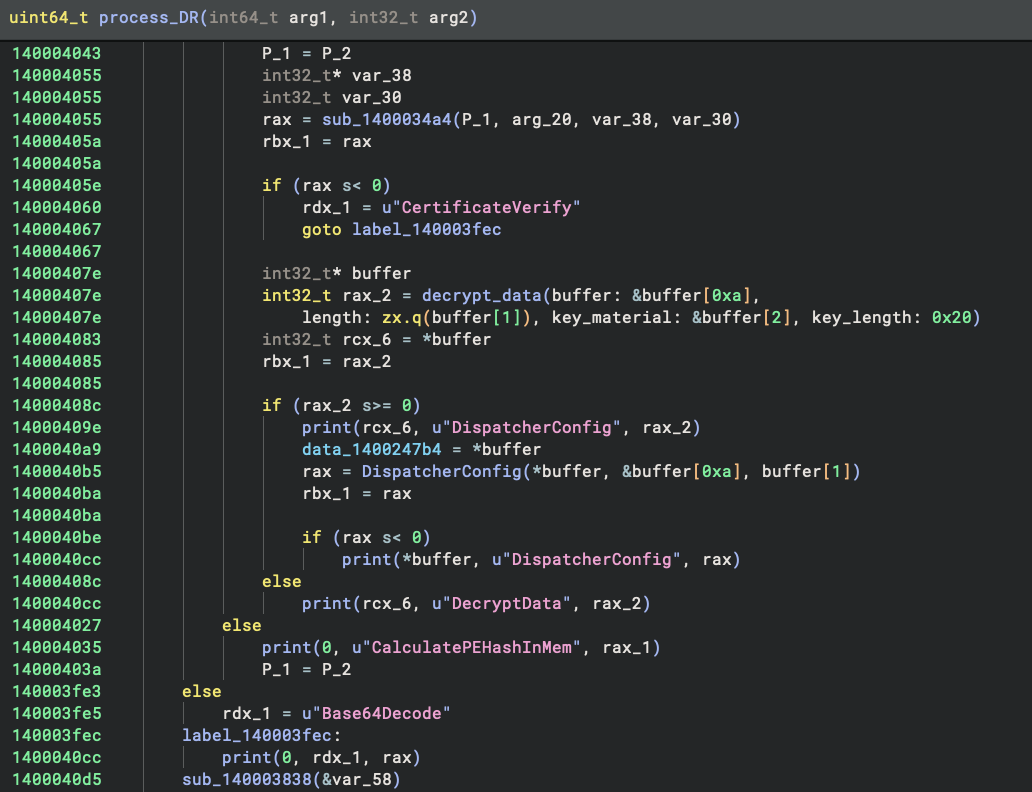
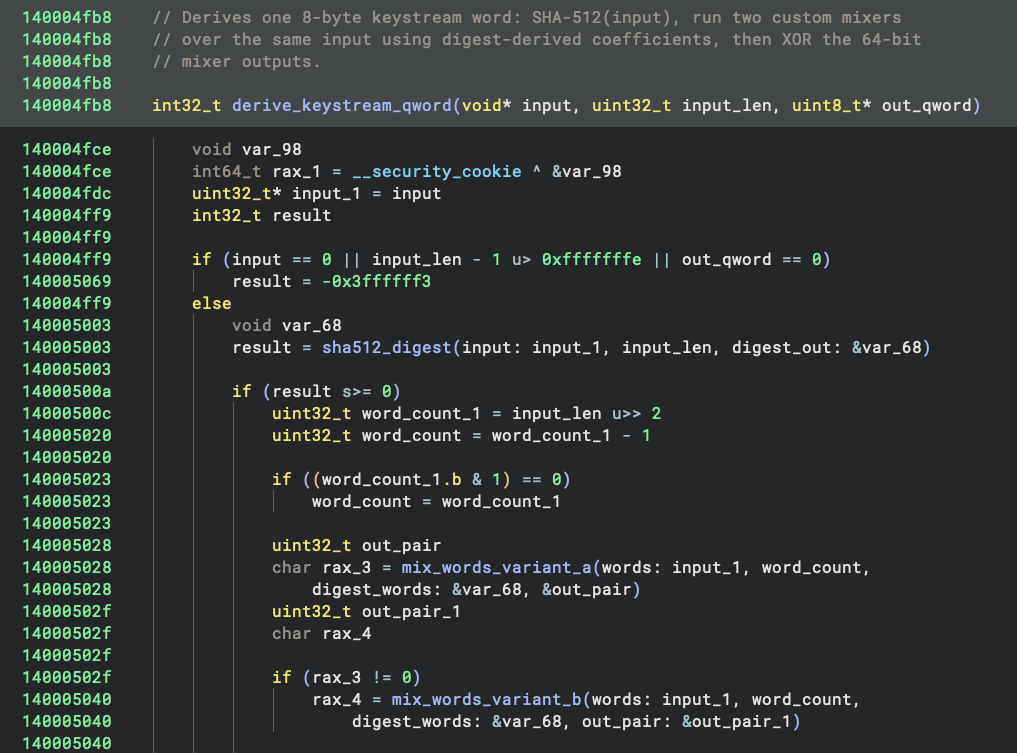
Stage 5 is the one I cared about. I asked Sidekick, our AI assistant, to reverse the decryption function. Its answer: this is a custom XOR stream cipher. A hash function derives a set of seeds from the key, those seeds generate a keystream, and the keystream gets XORed against the ciphertext. Nothing exotic.
It also renamed everything as it went: expand_key_state, derive_keystream, and the two mixing functions. That turned
the wall of sub_140004xxx calls into something you can actually read. I had a quick glance at the code and it seemed
correct.
Reimplementing the Cipher
Then I had Sidekick re-implement the whole thing in Python.
Before I could run the code, I noticed that the cipher needs a 32-byte key, but the function doesn’t have one baked in. Thus, it has to come from the data itself.
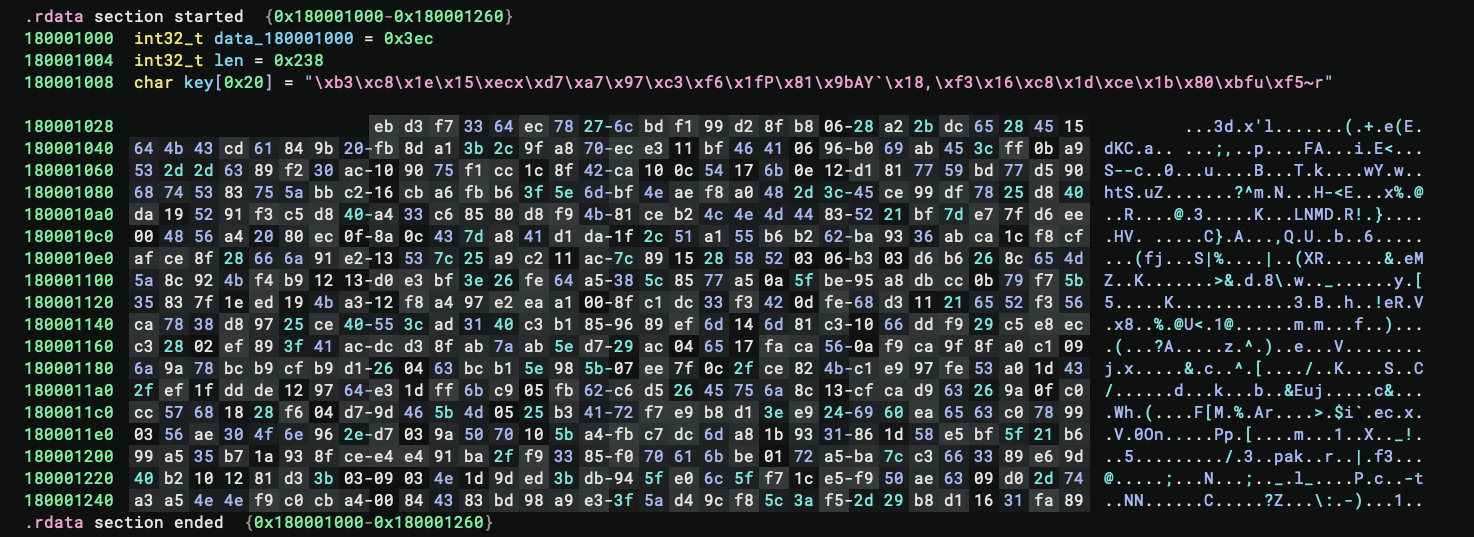
Looking at the start of .rdata, it is not hard to see that it begins with a u32 schema version of 0x3ec, followed
by a u32 of 0x238, which looks exactly like the length of the ciphertext. If I take the next 0x20 bytes as the encryption key, the
remaining bytes in the section are exactly 0x238. It all checks out! The layout is shown below:
I handed this to Sidekick and asked it to decrypt the blob. However, despite my high expectations, the result was garbage:
00000000: fe 2a 56 4a e3 ff fb 5b 9f 78 91 bd 2b d0 5c 59  .*VJ...[.x..+.\Y
00000010: 0d 92 1f e9 10 c0 44 8f 0a 2d c5 2d c8 b9 54 7d  ......D..-.-..T}
00000020: be bd 53 65 68 2b b4 08 63 f0 69 89 2e 4c a0 7a  ..Seh+..c.i..L.z
00000030: 2d ca 1c 50 75 00 80 09 f3 ef 41 8e 78 67 7f 49  -..Pu.....A.xg.I
00000040: f5 0a 1e f2 b1 49 05 b5 8e b2 51 2d 27 44 0f 1c  .....I....Q-'D..
00000050: 36 6f bc 39 8f cb 60 49 ee 1c 46 0e 16 a2 b1 91  6o.9..`I..F.....
00000060: 92 40 27 84 64 02 92 41 a2 ec a8 dc d1 4f 54 3f  .@'.d..A.....OT?
My first impression was that Sidekick blew it. So I asked Claude Code to redo it with Binary Ninja’s MCP server. I deliberately only gave it the binary instead of the analysis database, so it could not be affected by Sidekick’s renaming or type information.
This time it wrote another script, which produced the exact same garbage output. When challenged, it even brought Unicorn in and emulated the code to argue that it had done everything correctly.
The chances of two AIs getting it wrong in exactly the same way seemed quite low, so I suspected something weird was going on. I just couldn’t immediately tell what it was so I sat on it for a while.
Finding the Right Hash
After stewing on the problem some, I decided to Google several of the magic constants used in the cipher. This was how
we used to do things without AI! There were a few hits, and none of them appeared to be helpful. Then, out of pure luck,
I decided to search with DuckDuckGo, and this time I got a promising hit:
CalcHash_CS64. It appears to implement the same algorithm in C.
Still doubtful, I handed that to the AI anyway and asked it to see if it could get anywhere. And this time it actually worked! The blob decrypts to something readable:
00000000: 01 00 00 00 03 00 00 00 0c 00 00 00 28 02 00 00  ............(...
00000010: 01 00 00 00 f4 03 00 00 0c 00 00 00 18 02 00 00  ................
00000020: 0e 00 00 00 ee 03 00 00 0b 00 00 00 1a 00 00 00  ................
00000030: 2a 00 5c 00 64 00 6c 00 6c 00 68 00 6f 00 73 00  *.\.d.l.l.h.o.s.
00000040: 74 00 2e 00 65 00 78 00 65 00 ee 03 00 00 0b 00  t...e.x.e.......
00000050: 00 00 12 00 00 00 2a 00 5c 00 72 00 65 00 67 00  ......*.\.r.e.g.
00000060: 2e 00 65 00 78 00 65 00 ee 03 00 00 0b 00 00 00  ..e.x.e.........
And the only difference between the two versions is that CalcHash_CS64 uses MD5 to derive the seeds, while our
reimplementation uses SHA-512. But UCPD’s code clearly uses SHA-512 to derive the seeds:
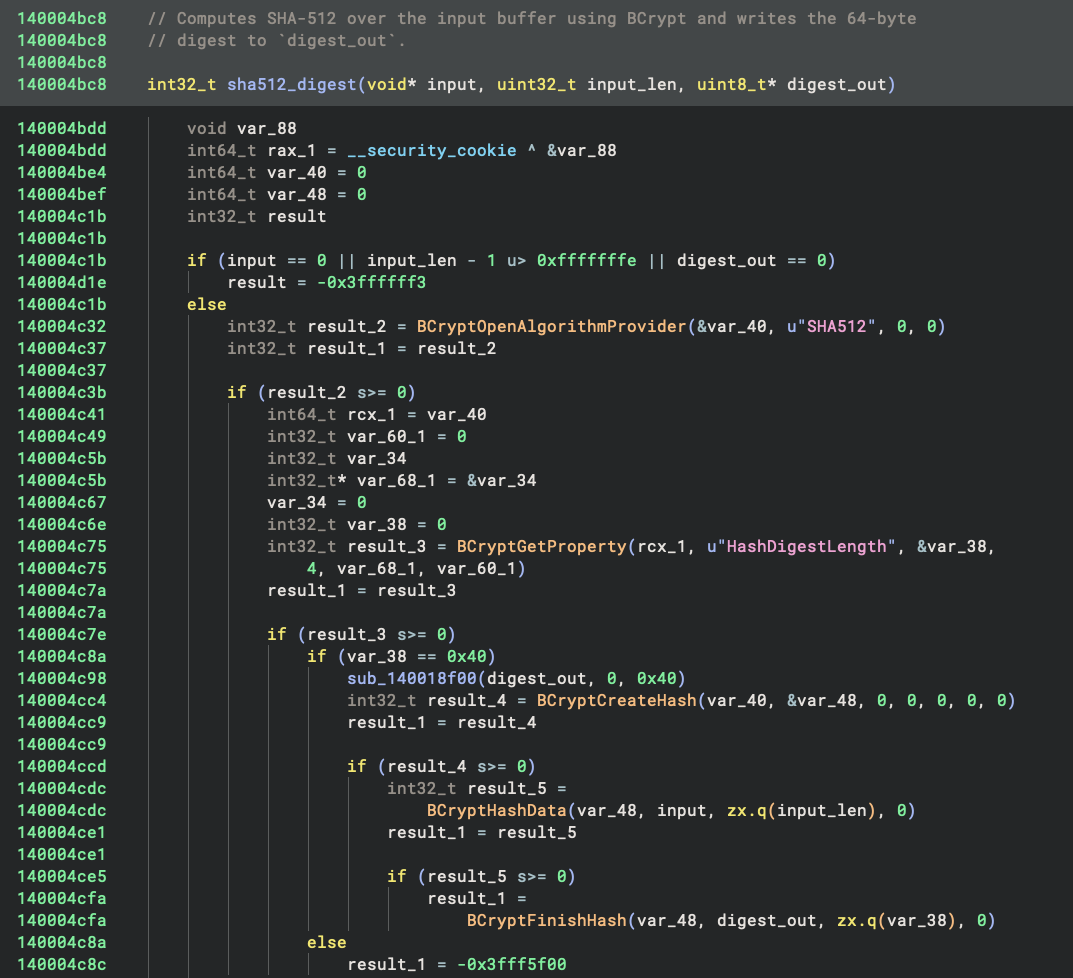
Here is what I think happened. At some point somebody at Microsoft looked at this code, saw MD5, and decided to harden it with SHA-512. But they only changed the driver, and forgot to update the code that generates the ciphertext.
I don’t think the failure is silent, either. That DecryptData failure path is not a debug print, it is an ETW
telemetry event. So somewhere at Microsoft there should be a steady drip of decryption failures firing every time this
key is parsed. To be clear, I have not debugged a live machine to confirm that, but it is fairly clear from the code. If
you happen to work on UCPD at Microsoft: go check your telemetry!
With that said, AI did a great job but we’re not quite at AGI yet.
What is in the Dynamic Rules
We can see 14 program names from the decrypted blob:
*\dllhost.exe    *\reg.exe       *\rundll32.exe   *\powershell.exe
*\regedit.exe    *\wscript.exe   *\cscript.exe    *\cmd.exe
*\InfDefaultInstall.exe          *\pwsh.exe       *\wmiprvse.exe
*\regini.exe     *\bssafe.exe    *\mshta.exe
If you read my first UCPD post, that list will look extremely familiar. These are Microsoft’s own signed binaries – they
pass the “is it signed by Microsoft” check trivially – so they get their own denylist. Otherwise flipping the default
browser would be as easy as asking reg.exe to do it for you, which defeats the purpose of the driver.
Now, why ship this in a registry key at all? The very same list of names is already hardcoded in UCPD.sys.
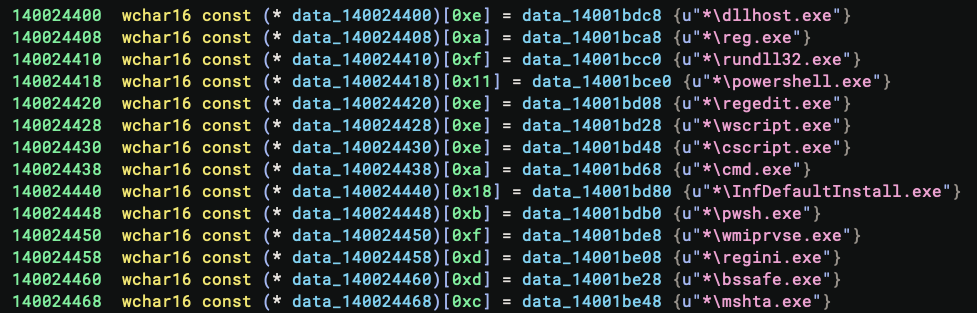
Remember the key is called DR. I don’t believe it’s Disaster Recovery, but rather it stands for Dynamic
Rules. Changing the driver’s behavior normally means shipping a new UCPD.sys, and then getting users to install an update
and reboot. With this channel, Microsoft can push a policy update as a signed blob in a registry value and have it
take effect on the next load. It is similar to a definition update for an AV product.
And it is considerably more than a list. I had the AI reverse the dispatcher as well. The decrypted buffer is a nested
TLV tree – first a u32 count, then records of [type][value kind][length][payload] – walked by a dispatcher that looks up
each type in a handler table populated at driver init. Five of them are registered:
| type | name (from the ETW events) | what it configures |
|---|---|---|
| 1 | AntiInjection |
injection enforcement policy, 6 typed sub-fields |
| 2 | UIA |
UI Automation policy, a table of 32-byte entries |
| 3 | DenyListV1 |
process patterns denied from touching protected keys |
| 4 | AllowListV1 |
process patterns allowed, separate list and lock |
| 5 | StackTrace |
module names matched against the call stack of a write |
Our blob is a single type 3 record. Deny and allow are independent structures with separate locks, so a config can deny broadly and then carve out exceptions. Each handler takes a lock, rebuilds its structure from scratch, and emits an ETW event tagged with the rule name and a schema version.
For now the list it ships is identical to the one already compiled into the driver, so at the moment it changes nothing – but the machinery is there for the day a browser vendor finds a new way around the protection.
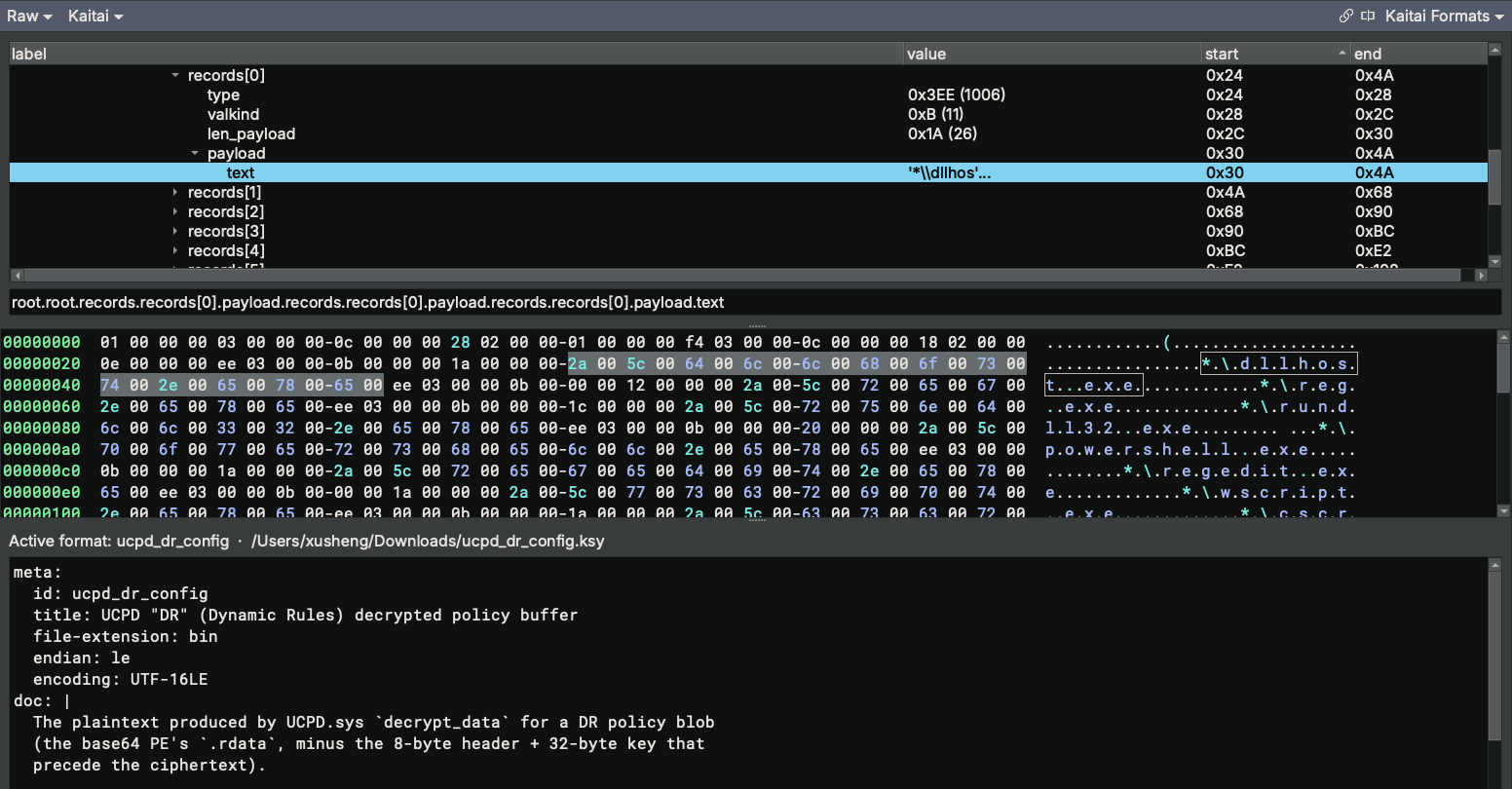
I also wrote a Kaitai Struct definition for it and rendered the parsed tree directly in the Binary Ninja UI using our Kaitai UI plugin (with a patch).
Why this Crypto? The “Patent Hash”
The story could end here, but there is one more thread that ties everything together.
Throughout the analysis, the AI kept referring to the hash function as the “patent hash”. I assumed this was a hallucination, but Microsoft holds an actual patent on this exact cipher: US 6,570,988 B1 (expired around 2020), “Simple technique for implementing a cryptographic primitive using elementary register operations.”
And it is the same algorithm Windows uses to compute the UserChoice association hash.
Think back to the pre-UCPD world. Under the UserChoice key you had a program ID and a Hash value. That hash mixes your
username, the program ID, the extension or protocol, and a timestamp. If it does not validate, Windows ignores your
default and falls back to Edge. It is the tamper-evident layer that UCPD was later built to enforce in kernel mode. It
was reverse engineered by Christoph Kolbicz back in
2017.
Firefox later implemented the same
algorithm so it could set
itself as the default browser without walking the user through Windows’ settings UI.
Now it is clear why Microsoft would roll their own cipher instead of just using AES: they didn’t quite. They had this lying around from UserChoice, so they reused it.
On AI + RE
There is no doubt that AI is getting better rapidly, and that more and more RE work can be handled by it. I still remember the shock when I heard that at last year’s DEF CON finals, a team’s AI beat both human players to a VM challenge from LiveCTF. Exactly a year later, that is not surprising at all. In fact, AI has become so good at RE that it is now hard to find challenges it cannot solve.
AI is only going to get better – better than most human reverse engineers. However, as this post shows, we still need a real person to examine its results and steer it when things do not check out automagically. Plus, only a human can appreciate the irony of a broken algorithm in the broader sense.
References
- Inside Windows’ Default Browser Protection – my earlier UCPD research
- FlyTech Videos, “Microsoft Added This Driver to Windows and Said Nothing”
276793422/CalcHash_CS64– the reference implementation that broke the case open- US 6,570,988 B1 / WO2000078118A2 – the Microsoft patent
- SetUserFTA: UserChoice hash defeated – Christoph Kolbicz on the original use of the patent hash
- UCPD.sys - UserChoice Protection Driver - Part 2 – Kolbicz’s follow-up research on UCPD
- https://hitco.at/blog/windows-userchoice-protection-driver-ucpd/
- https://github.com/xusheng6/ucpd_analysis – all of my UCPD analysis databases and tooling
202606_DR/– everything from this post: the.regcaptures, the extracted PE, the analysis databases, a standalonedecrypt_reg.py, and the Kaitai definition