
Binary Ninja 6.0 (Krypton) is here! This is a major version bump, and it’s worth the wait. We’ve shipped a brand new MCP server, a new Binary Similarity feature, and a complete overhaul of the Plugin Manager as the new Extension Manager. Under the hood, you’ll find major improvements to performance and memory usage, a refactored calling convention to properly represent structure parameters and return values, and added HLIL structure initializers. On the scripting side, we’ve updated the bundled Python version to 3.13 and included it on Linux. We’ve also added a new TMS320C6x architecture, a new user wizard to ease migration, and a long list of debugger improvements. And those are still only some of the new features detailed below.
We’re also improving the free edition. We’ve added the highly requested armv8 (AArch64) architecture as well as the above-mentioned MCP server. Additionally, we’re also shipping a new Linux ARM64 build of the free version. Next, as previously announced, with this release we’re putting our new pricing and packaging into effect. Finally, thanks to everyone who participated in our 10 year celebration! We’re looking forward to another decade!
- Performance and Memory
- MCP
- Binary Similarity
- Architectures and Platforms
- Analysis
- Scripting and Extensions
- New User Wizard
- Debugger
- Packaging and Licensing
- Open-Source Contributions
- Everything Else
Major Features
Performance and Memory
Let’s start with some some universally applicable improvements. No matter how you use Binary Ninja, you’ll see some fantastic speedups in 6.0 while also seeing decreases in memory usage. Exact improvements depend on the workload and hardware, so we picked some representative sample binaries and ran a gamut of testing. The results speak for themselves.
5.3 stable 6.0 stable
syspolicyd
Mach-O universal, x86-64 slice
4,215 functions2.6 MB
1.97× faster
18% less
19% fewer
chrome_crashpad_handler
ELF x86-64
6,092 functions1.9 MB
1.06× faster
32% less
21% fewer
locationd
Mach-O universal, x86-64 slice
28,372 functions19.0 MB
1.54× faster
40% less
16% fewer
ntoskrnl.exe
PE32+ x86-64
34,146 functions12.8 MB
2.02× faster
55% less
53% fewer
libbinaryninjaui.so.1
ELF x86-64 shared object
43,957 functions136.1 MB
1.37× faster
7% less
10% fewer
vmlinux 6.14
ELF AArch64, with DWARF
92,961 functions511.8 MB
2.16× faster
29% less
52% fewer
chrome
ELF x86-64, with DWARF
950,042 functions1.47 GB
2.03× faster
25% less
35% fewer
How this was measured
- Machine
- AMD Ryzen 9 9950X (16 cores, 32 threads), 96 GB RAM, Ubuntu 26.04. Measurements made while idle.
- Procedure
- Default headless analysis to completion including full decompilation, three runs per binary (one for Chrome), reporting the mean. Time is wall-clock analysis time; memory is peak resident set size.
As you can see, across a representative corpus, 6.0 analyzes up to 2.16x faster than 5.3 while using as much as 55% less peak memory.
These gains come from many changes rather than any single optimization. There were dozens of smaller fixes, hundreds of hours of profiling, new tools developed to analyze memory usage, and Brian, Mark, Ryan, and others working to optimize the system. Nothing was sacred: many long-standing data structures and sections of code were critically examined for potential improvements.
Analysis Cache
Binary Ninja maintains an analysis cache of analyzed functions. However, choosing when to re-analyze and when to cache can be tricky to get right from a performance perspective. With improved instrumentation and analysis, we were able to make much better use of the existing analysis cache while also fixing some bugs along the way.
Database Saving
This is just the beginning as we’re planning to focus even more on save and load times in future releases. However, in 6.0, we’ve already improved both memory usage and time taken for saving, as well as fixed a file size creep bug where files could keep growing with repeated saves.
MCP
While, in a previous release, Tim and BK on the Sidekick team added external MCP server support to Sidekick, with Binary Ninja 6.0, we shipped a first-party MCP server. It’s “batteries included” for the LLM-using world. It can interact directly with the UI you are looking at or, for versions of the product with headless API support, can be used directly without the UI at all.
There are two variants. The GUI MCP server runs inside Binary Ninja, communicating over HTTP, and is included in all editions including free. The headless MCP server is a standalone binaryninja_mcp binary that communicates over stdio, and is included with Commercial and Ultimate on macOS and Linux. Native Windows packages don’t ship the headless binary yet. Use the built-in GUI MCP server there or run the Linux build under WSL. This is an unfortunate limitation due to Windows’ file system locking, where a running MCP server can corrupt or block an installation.
Both variants expose the same data and allow the same actions: opening files and databases, selecting BinaryViews, driving and waiting on analysis updates, a compact triage summary of a binary, program structure (entry points, segments, sections, symbols, imports, exports, relocations, data variables, and strings), raw memory reads, function inspection covering metadata, disassembly, Pseudo C, ILs, and many more useful properties. They can rename objects, create and apply types, and create data variables as well.
Turning on the GUI server is easy: enable ui.mcp.enabled in settings and restart to automatically start, or run Plugins > MCP > Start Server for one-off runs. With default settings it listens at http://127.0.0.1:24642/mcp, and Plugins > MCP > Copy Connection Info will hand you the exact URL and authorization header for your session, so you can paste it straight into your client. If you’d rather lock it down, set ui.mcp.token and clients will need to send a matching bearer token.
The documentation has ready-to-paste configurations for Claude Desktop, Cursor, VS Code, and Codex, as well as much more information.
Binary Similarity
Binary Similarity is, at heart, the task of noticing that the two functions in front of you are the same, except one has a cape and one wears glasses.
With 6.0, Mason created our Binary Similarity system for comparing two or more related binaries. It’s not a competing diffing engine to popular tools like BinDiff, Diaphora, or BSim. Rather, it’s a pluggable framework which can not only leverage multiple providers, but also allow you to integrate, compare, and do more with them than ever before.
We currently ship two providers: Google BinDiff (for finding structurally similar functions) and WARP (for finding exact function matches). All providers report similarity and confidence, allowing you to review possible matches, render them side by side, and apply the available analysis information to the new binary.
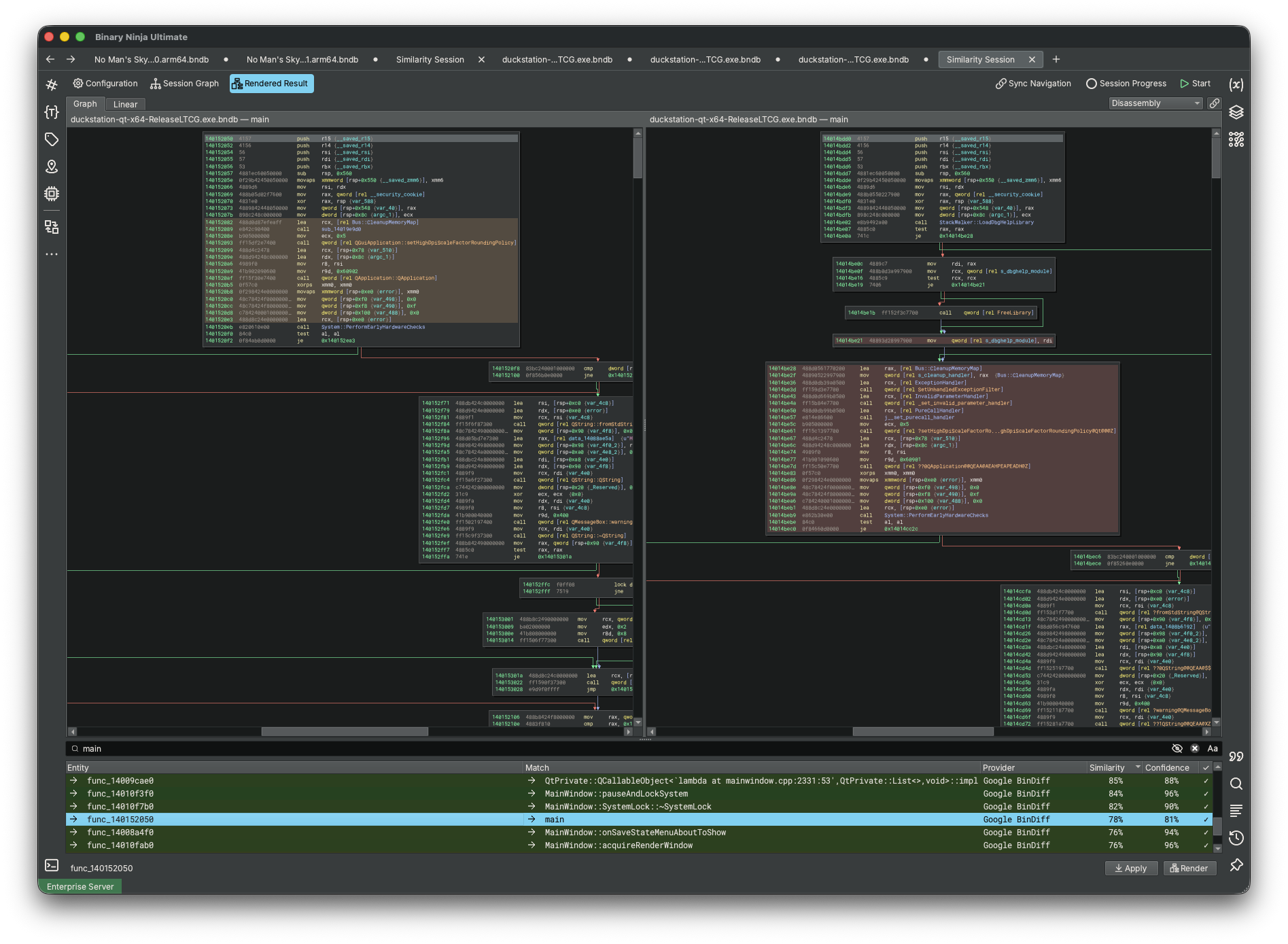
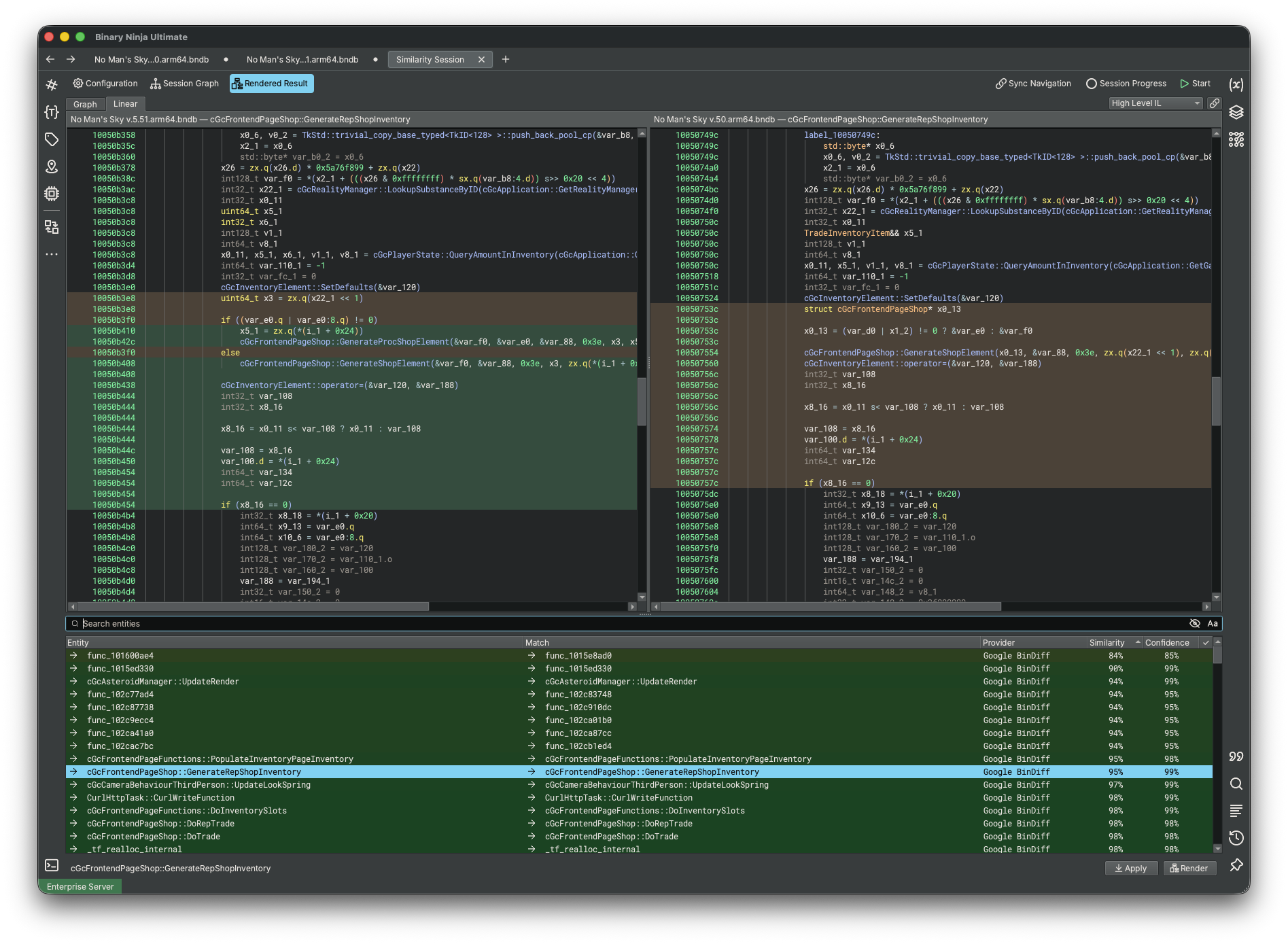
For example, when comparing two releases of a popular game, Binary Similarity quickly highlights the changes in cGcFrontendPageShop::GenerateRepShopInventory. Rendering the result keeps both versions in sync and highlights the differences, making it easy to identify patched logic.
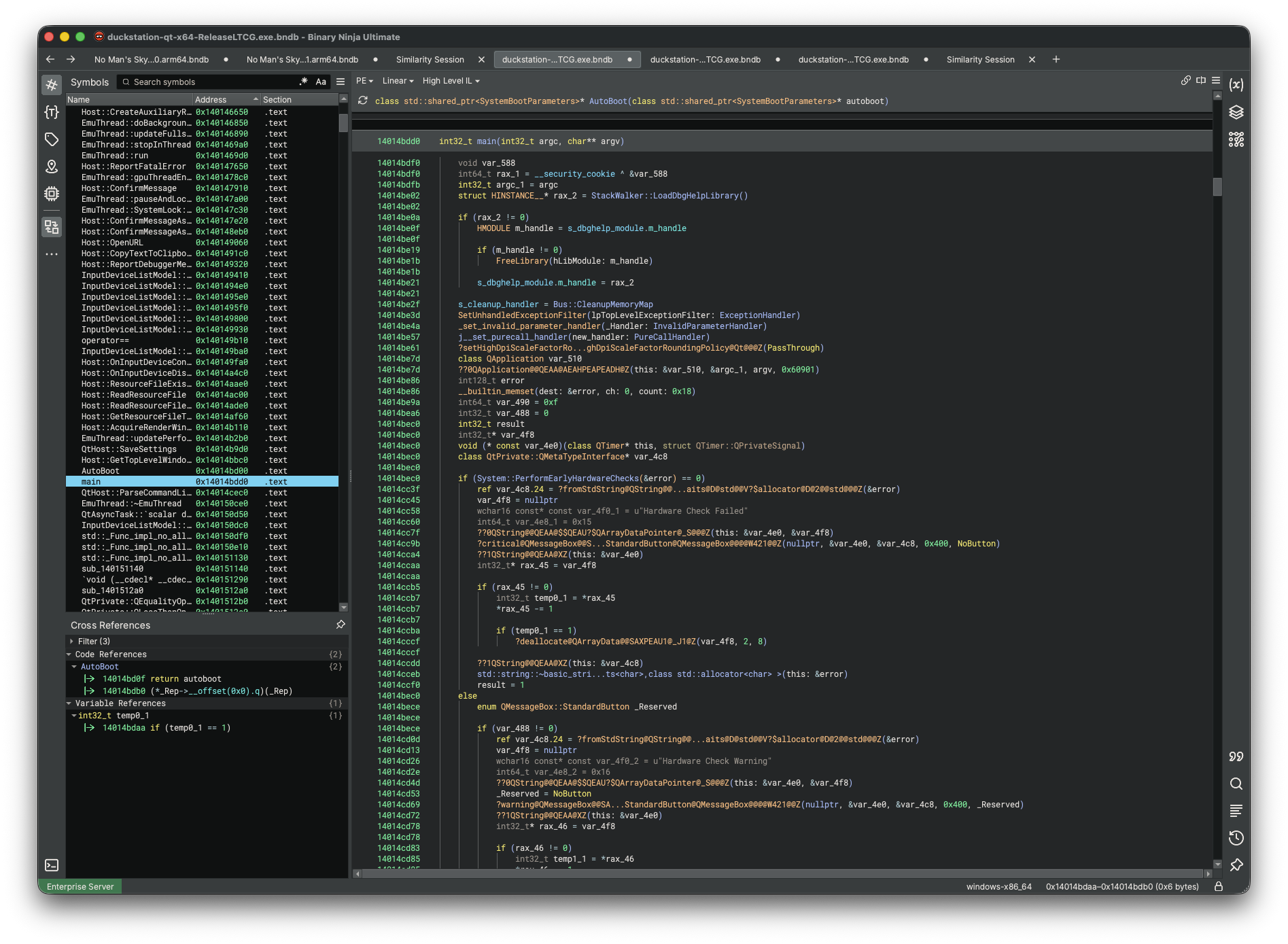
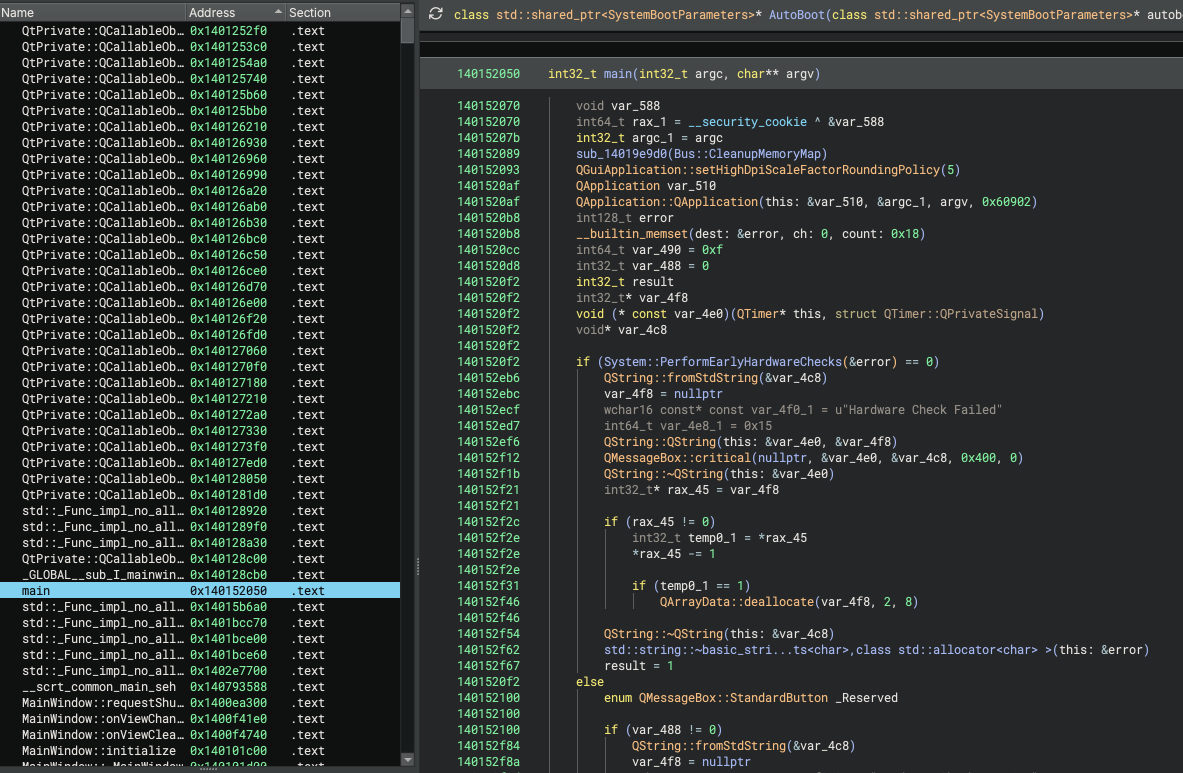
Patch diffing is not the only use case. Often you have a heavily annotated binary whose annotations you want to port to a newer (or different) version. With Binary Similarity, we can automatically transfer annotations from one binary to another, saving time and effort.
Of course, the UI is not the only way to use the new Binary Similarity functionality. This is Binary Ninja, after all: everything is pluggable and accessible via an API. The complete system is exposed through the Python API, C++ API, and Rust API, allowing you to create and run sessions headlessly.
Plugins can also register entirely new providers and resolvers. Providers find possible matches, while resolvers choose which results to use (and can apply them automatically), so the system is not limited to WARP and BinDiff or to our built-in matching algorithm(s). In fact, the third-party binja diff plugin, which wraps QBinDiff by Quarkslab, already supports adding QBinDiff as a provider for a second opinion to BinDiff.
NOTE: Binary Similarity is only available in Ultimate.
For more information on configuring sessions, reviewing and applying results, or running it headlessly, see the Binary Similarity documentation. Our immediate roadmap includes new integrations and even our own novel matching implementation, so stay tuned!
Architectures and Platforms
TMS320C6x
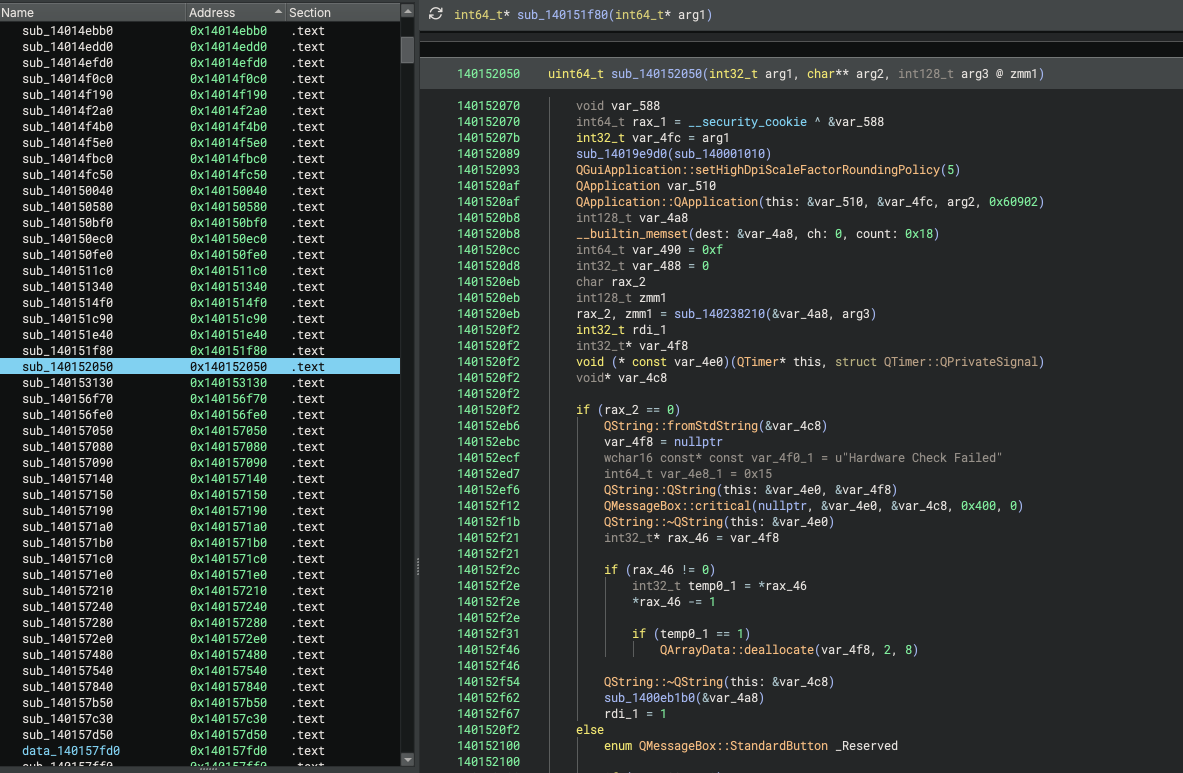
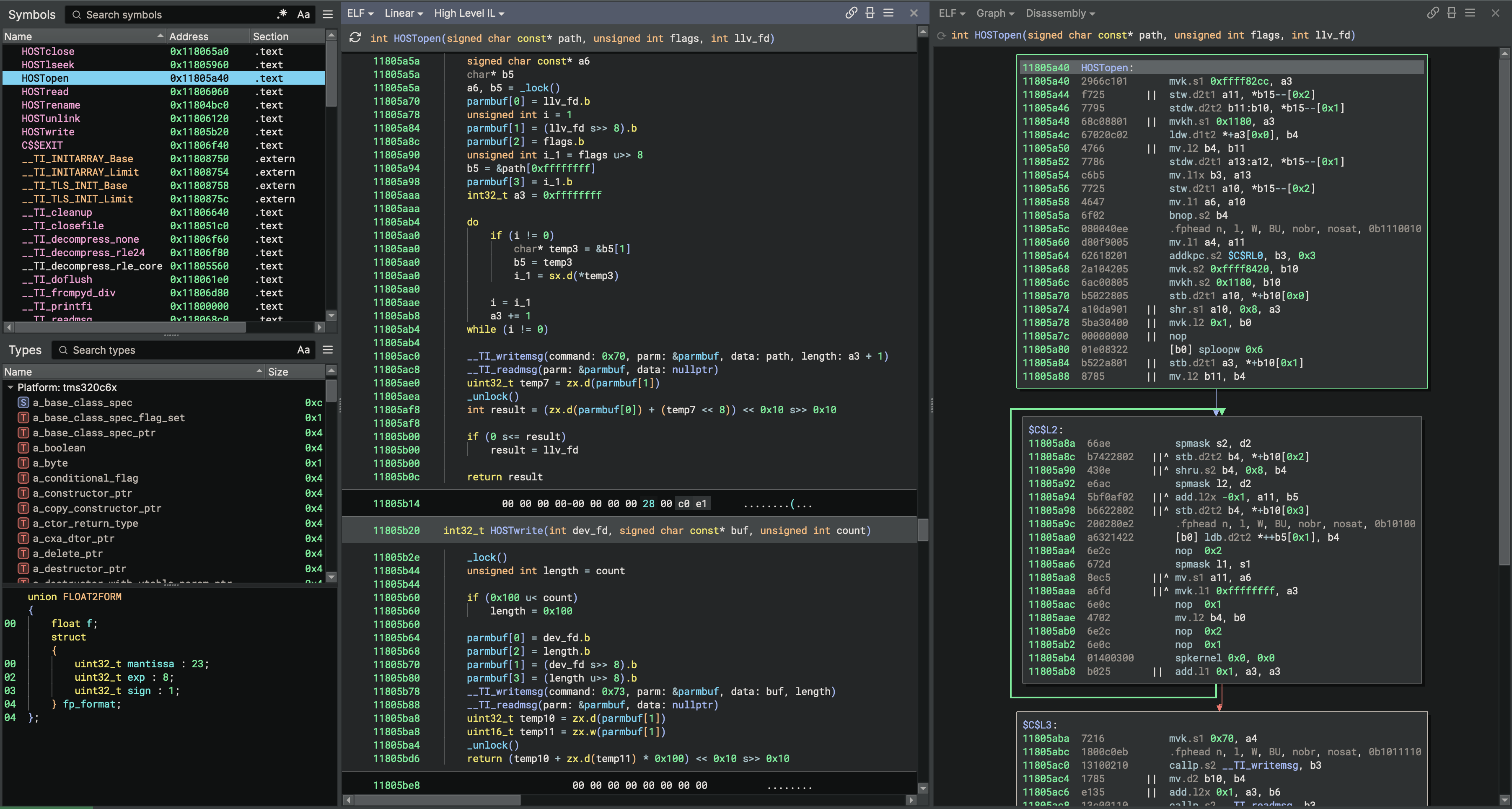
Brandon’s been on a DSP kick and adding those difficult-to-decompile architectures to Binary Ninja. First it was Hexagon and, now with 6.0, it’s TMS320C6x.
Keep an eye out for an upcoming blog post with more details about all the behind-the-scenes changes and how we can now handle such a problematic architecture. In the meantime, all customers with current Ultimate support can update to a version with 19 first-party architectures!
Here’s a quick sneak peek for everyone else:
Multiple Global Pointers
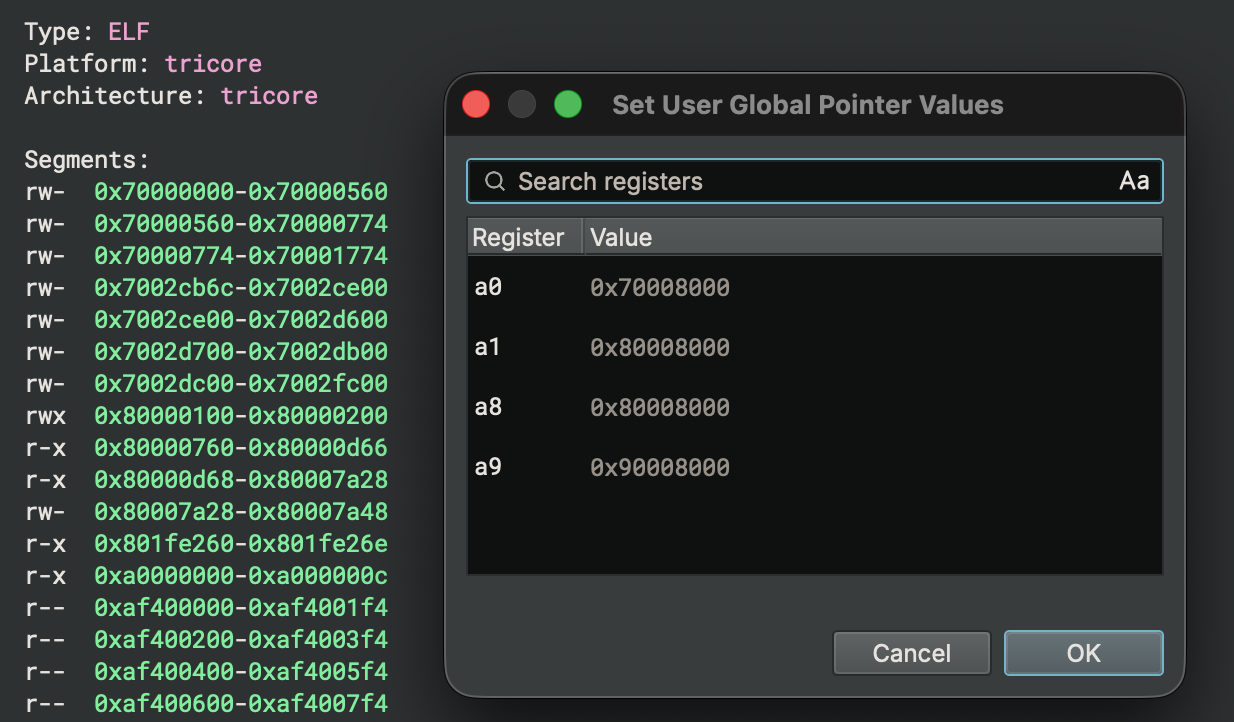
Binary Ninja could previously track and allow users to override only a single global pointer register, but that doesn’t cut it for every architecture. TriCore, for example, uses four registers to point into different global data regions, and Binary Ninja can now track and override each of them independently. With accurate global pointer values available during analysis, references to global data resolve correctly and produce much cleaner decompilation.
Analysis
Improved BASE (Fast Analysis Mode)
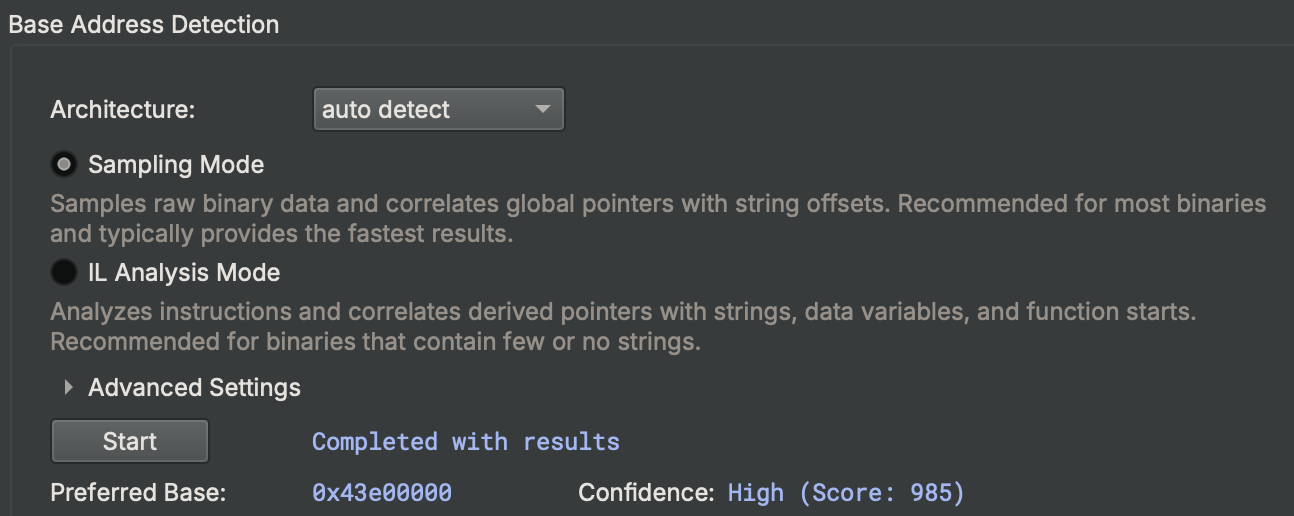
Introduced in a previous post, BASE is our automated base address detection feature built into all versions of Binary Ninja. With 6.0, it includes a new “sampling” mode, enabled by default, which can produce accurate results much faster. It’s especially useful for large files, though the previous IL Analysis Mode is still available when accuracy matters more than speed.
Calling Convention Refactor
One of our main thrusts going forward is better handling of language-specific decompilation. We’ve built language representation features for that, and our workflow system lets us tweak the decompilation in many useful ways. But our type system, calling convention, and ILs likely need changes to fully support the most modern programming languages. Instead of sticking to just treating everything like C, we want to keep working toward language-specific support like we have with Objective-C.
To that end, in 6.0 Rusty refactored our calling convention system. We can now support structure returns and parameters which are used by a number of languages. Most of the changes you’ll see in 6.0 may seem minimal at face value, but actually unblock several future language-specific decompilation improvements that you should see in upcoming stable releases (or even sooner if you follow our development branch).
That said, we do ship two specific changes in 6.0. While the added Go and Pascal calling conventions don’t do much out of the box, when combined with a plugin like Delphinja, you can get some much improved results since it includes type libraries and specific debug information parsing that can leverage the new convention!
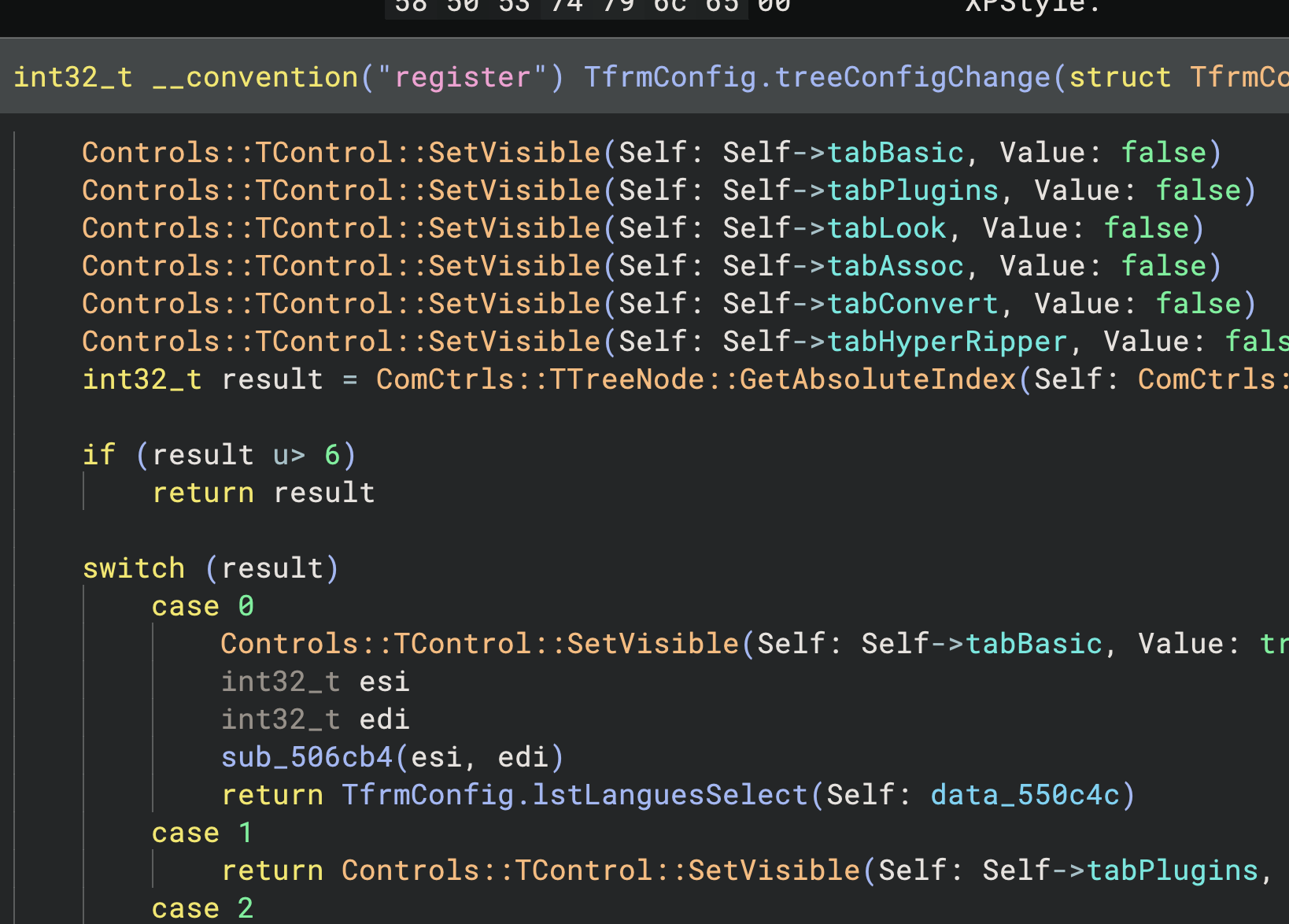
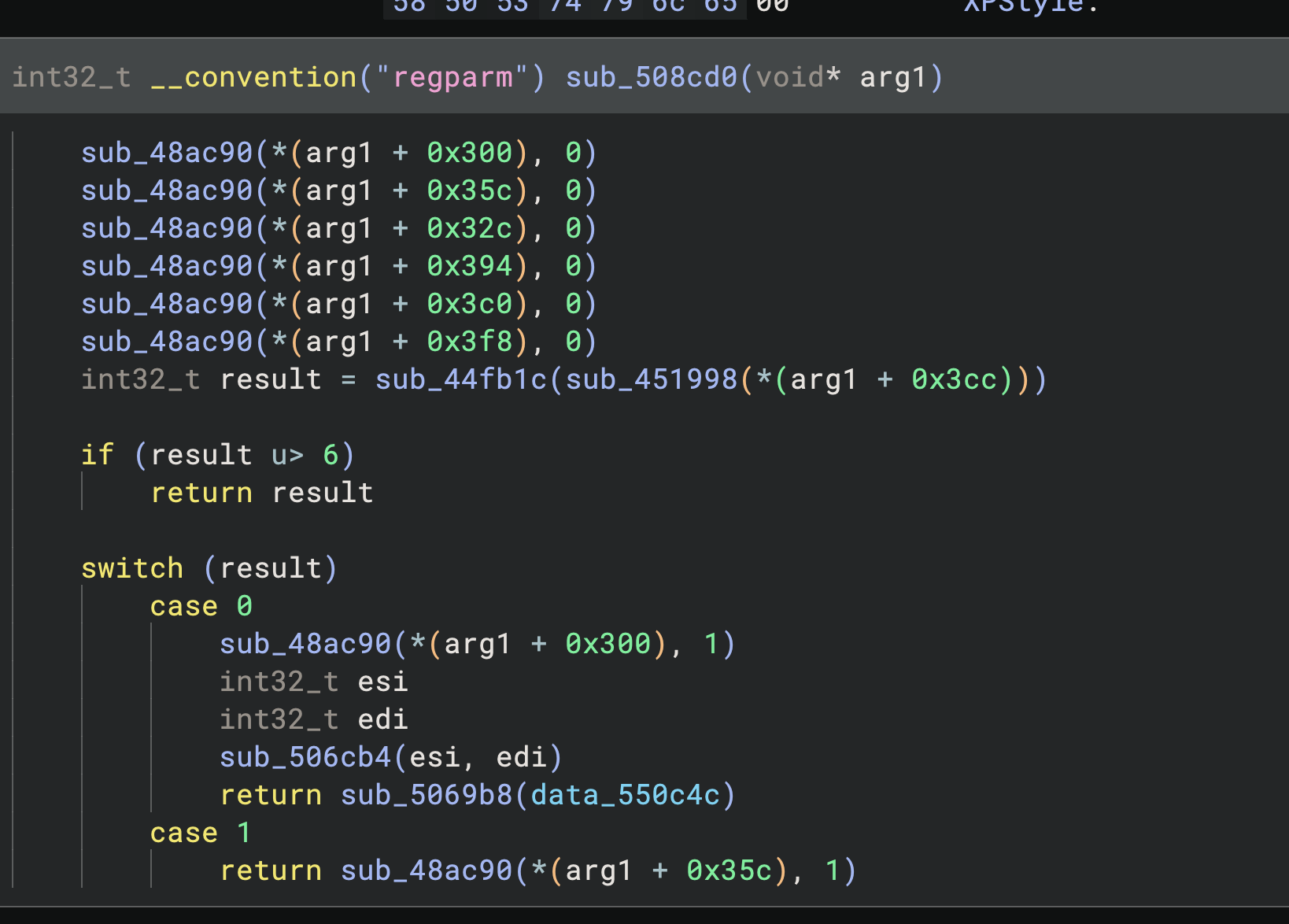
The Go calling convention support is in the core, but as we’re not yet processing the metadata available in .gopclntab sections and similar information, you won’t see any automatic changes yet. Keep an eye out for this in the next stable release!
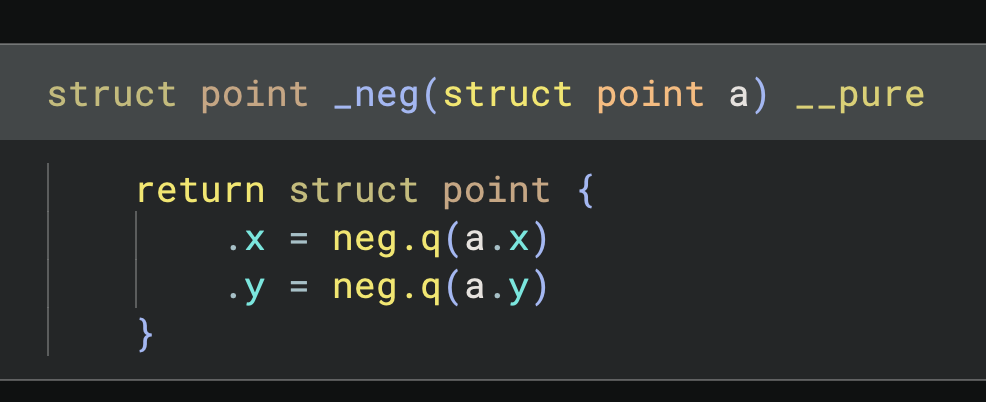
HLIL_STRUCT_INITIALIZE
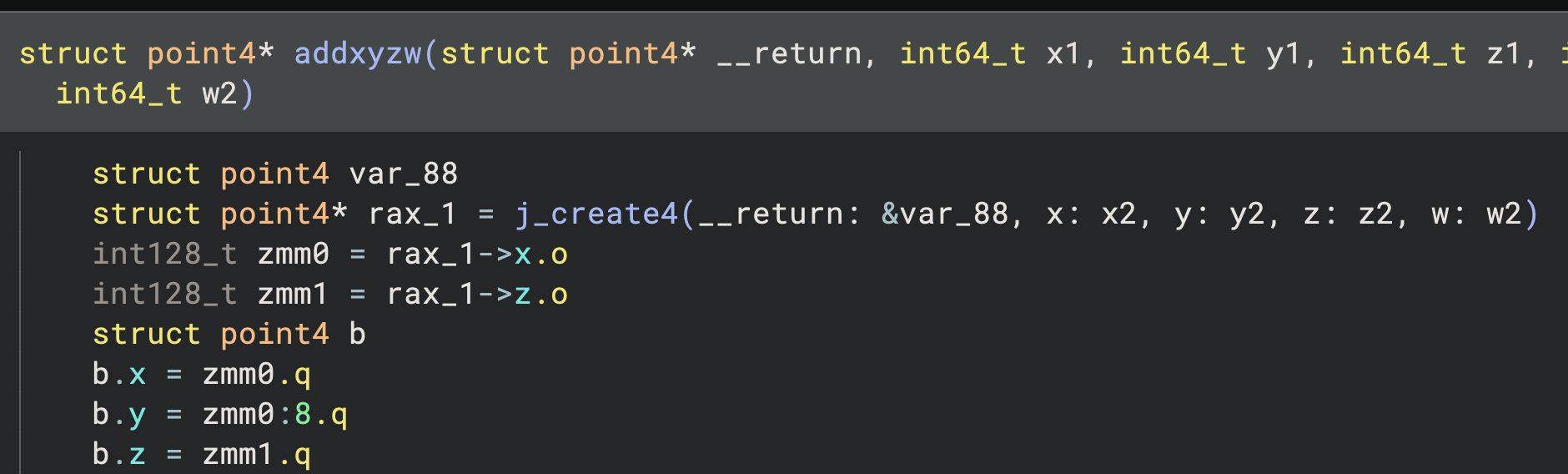
A new IL instruction and a system for initializer expressions greatly simplify structure initializations, resulting in some very clean decompilation.
Type Fragments
Fragments from Krypton are bad news. Type fragments in Krypton are great news.
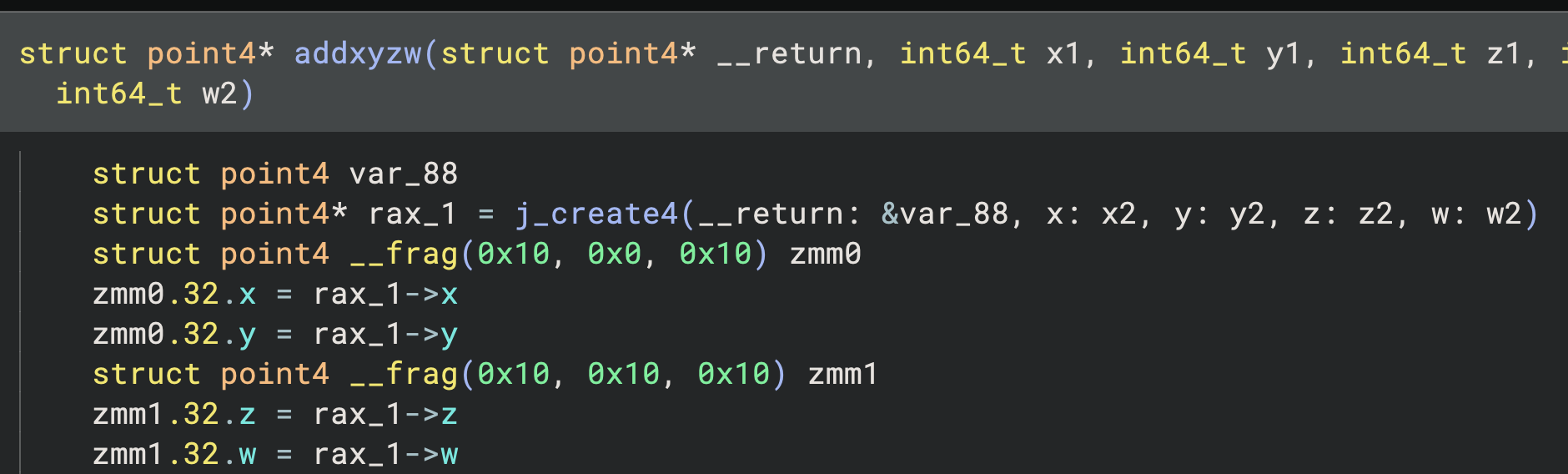
A type fragment represents a bitwise slice of a larger source type while that slice is carried in integer-like storage. When a calling convention passes pieces of a structure in registers, or an optimized inline memcpy copies a typed object in register-sized chunks, those pieces used to decay into integers and the connection back to the original object was lost. Type fragments preserve that relationship, tracking which bits of which source type a given register is holding as it flows through the program.
These are intermediate, in-flight types used by analysis rather than something you’ll define yourself, and they render in decompiled output using __frag notation (or __frag_be when the source is big-endian). Together with the calling convention refactor above, this means structures split across registers keep their types instead of just dissolving into integers.
Scripting and Extensions
Python 3.13 and Linux
We’ve been shipping a bundled Python in our macOS and Windows builds of Binary Ninja for a while now. Starting in 6.0, we ship this bundled Python with all builds on all platforms, including x86-64 and AArch64 Linux. This means that our support for third-party Linux distributions should be a bit more reliable since we don’t need to make assumptions about what’s installed by default.
While he was at it, Alex also bumped the included version to 3.13 to keep things a bit more modern. Our minimum supported version is still 3.10 if you require something older, however.
This does mean that if you were running the previously bundled version of Python and you switch, none of your plugin dependencies will be installed! The one-time Plugin Migration dialog will reinstall them for you.
Scripting Console
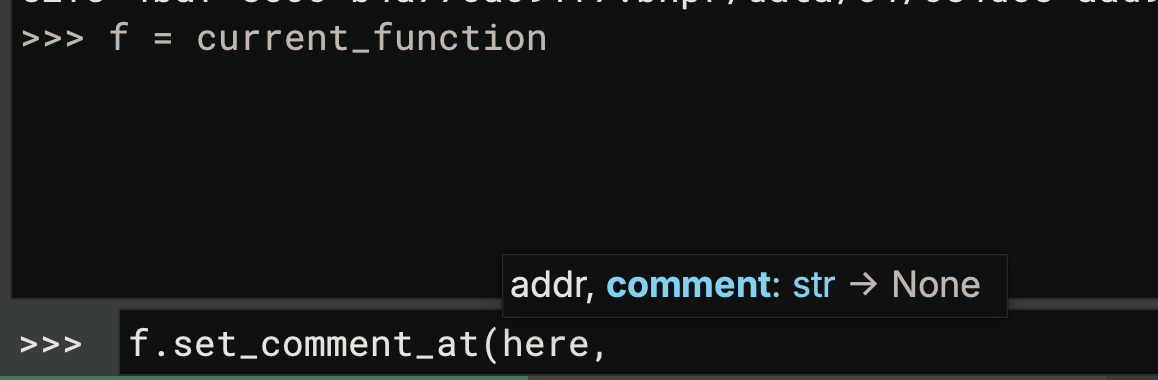
A small but noticeable quality-of-life improvement for those who do a lot of scripting: the scripting console now hints at individual parameters instead of just the prototype.
Extension Manager
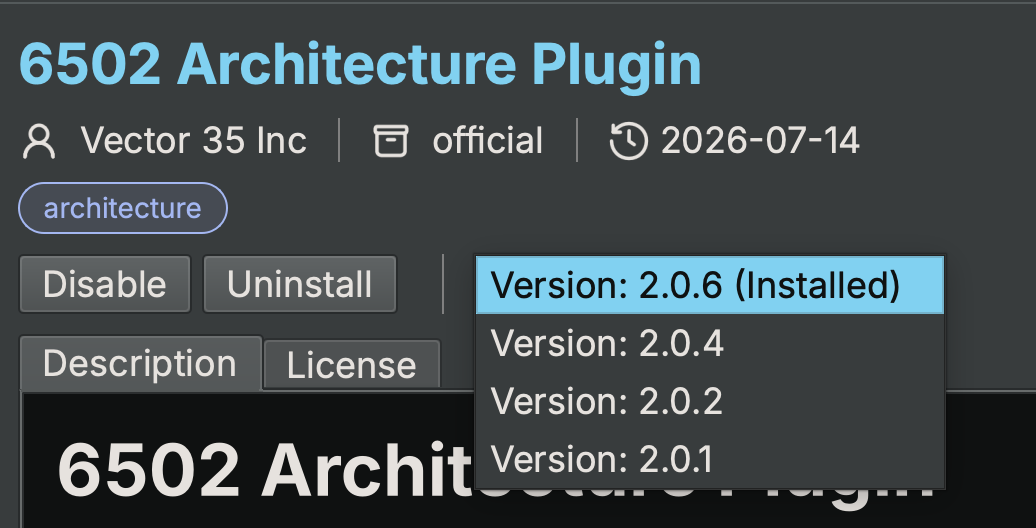
The Plugin Manager is dead, long live the Extension Manager! This change not only sets the groundwork for better plugin features, but also paves the way for native plugins and being able to install things other than plugins, like themes or type libraries. Almost half the team touched the extension manager code this release, it was truly a team effort.
Here are the main features you’ll see with the new Extension Manager:
- You can choose which version of a plugin to install
- Dependency installation opens a dialog so you can see pip at work
- Conflicting dependencies have some auto-detection and resolution
- Plugin details are cached offline
- Plugins are more verbose about their status in details and the extension list
- The snippets plugin is shipped by default
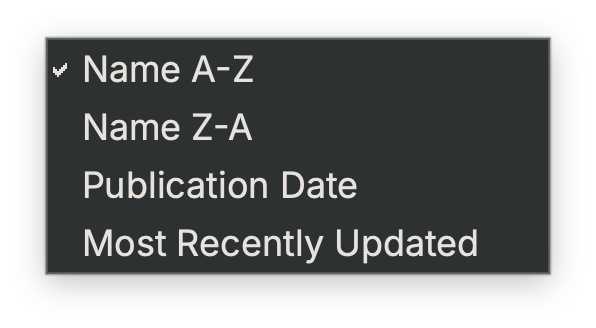
- Plugins can be sorted by name, publication date, or most recently updated
One heads-up if you’re updating: Extensions installed through the extension manager are stored differently on disk, so your first 6.0 launch will run a one-time migration. This will reinstall everything you had previously, dependencies included, and re-enable them when it’s done.
We also want to have a special mention to one of our summer interns Ashvika who did a ton of work to improve our plugin ecosystem. If you notice many more plugins with proper images and readmes, you can thank her for it!
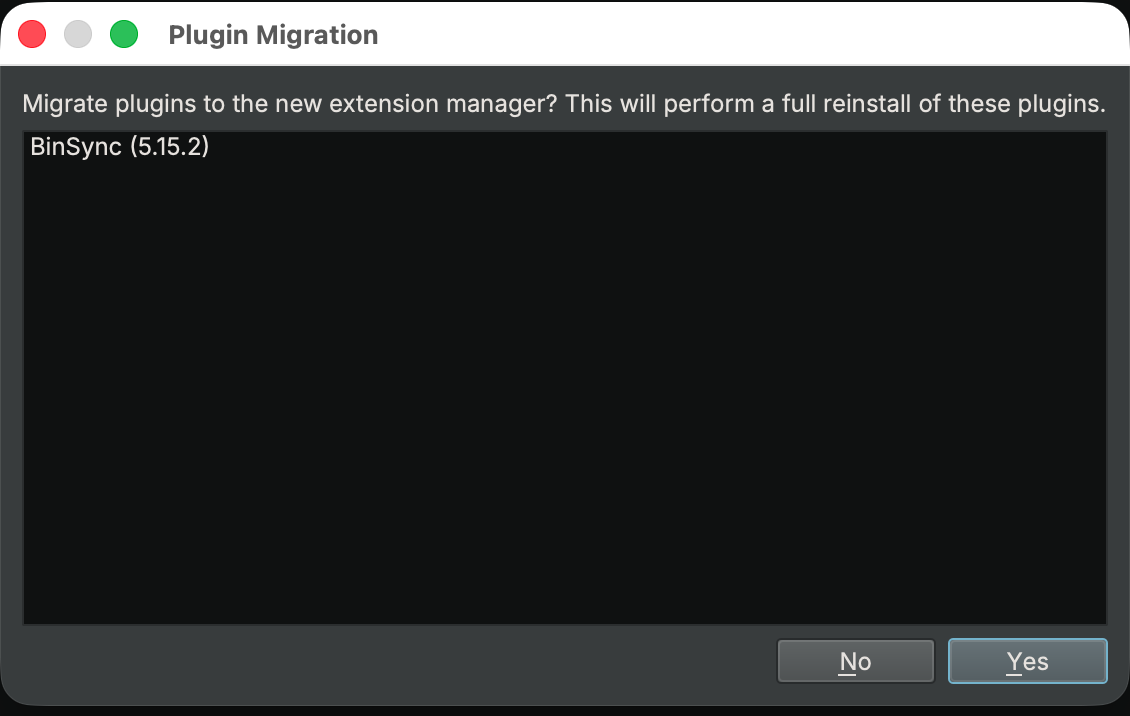
You’ll notice the new name in the API, too: The Python module is now extensionmanager, with a deprecation shim left behind.
New User Wizard
It’s hard to switch tools when you’re used to a particular workflow or hotkey, and it’s even harder to dig and find all the settings you might want to change in a new tool. New in 6.0 is a short three-step wizard. You choose a light or dark theme, a preferred experience, and a few privacy and network settings (automatic crash reports, automatic update checks, and online WARP).
The middle step is for you if you’re arriving from another tool. Next to the Binary Ninja defaults, you can pick a Ghidra or IDA-Like experience. There are multiple differences among them, and the configuration lives in docs/files in the API repository - contributions are welcome.
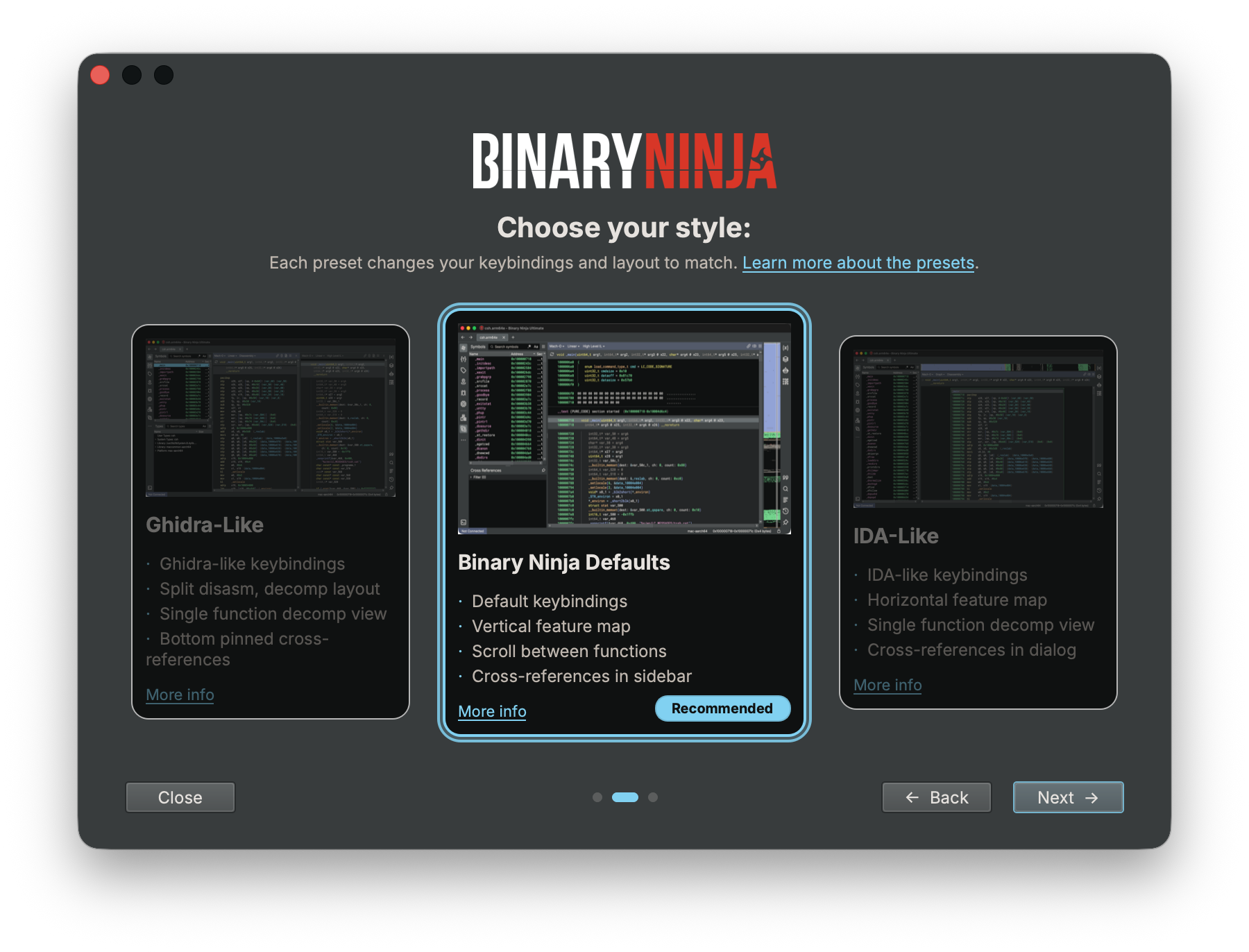
If you want more information about what’s different compared to other tools, check out our migration guide.
Debugger
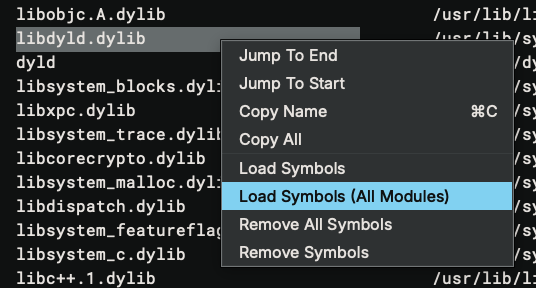
Krypton gives you a much clearer picture of the process around the code you are debugging. The new Debugger Memory Map sidebar shows every mapped region reported by the debug adapter, including its address range, size, permissions, and name. Binary Ninja can also mirror those mappings as individual memory regions, allowing Find to search mapped memory without trying to scan the entire address space. And when an address belongs to a library that was not part of the original analysis, you can now load symbols from the debugger backend on demand, either for one module or for all loaded modules. These are added as auto symbols, so they participate in analysis and annotations without overriding any names you have defined yourself.
- Feature: Added double-click navigation to a token’s runtime address during a debug session
- Feature: Added the ability to go to the previous/next register write in TTD (Time Travel Debugging)
- Improvement: Made the WinDbg/TTD version a setting instead of always downloading the latest
- Improvement: Refined double-click navigation while debugging
- Improvement: Skipped the adapter settings dialog on subsequent debug sessions
- Fix: Fixed LLDB target creation to use the executable path instead of the analyzed input file when debugging a shared library
- Fix: Fixed breakpoint removal after the debugger exits
- Fix: Fixed unreadable memory during TTD when the readable region is smaller than a cache block
- Fix: Fixed the register cache not being invalidated after a successful register write
- Fix: Fixed incorrect module end addresses on macOS with the LLDB adapter
- Fix: Verified the Authenticode signature of the downloaded WinDbg MSI bundle
Packaging and Licensing
New Features in Free
The most common request from Binary Ninja Free users was for AArch64 support, and with 6.0 it’s finally here! The free edition now decompiles armv8 (AArch64) in addition to x86, x86_64, and armv7 (with Thumb2). That covers the overwhelming majority of binaries most people run into today, and we’re happy to make the free version even more useful.
Adding armv8 also removed the reason we held back an ARM Linux build of Binary Ninja Free. So 6.0 ships a free installer for ARM Linux, available on the Binary Ninja Free download page.
Armv8 isn’t the only thing new in Free for 6.0. Our new MCP server is included, so you can point your favorite LLM at Binary Ninja and let it use our analysis completely for free. Free keeps getting more powerful under a yellow sun.
Everything else stays the same. It’s still free for non-commercial and commercial evaluation uses. The remaining limitations (no API or plugins and a reduced set of ILs) still apply. If you need any of our other architectures, the full breakdown of what ships in each edition lives on the purchase page.
Sidekick Free
In case you missed it over on the Sidekick blog, we recently launched free Sidekick credits for ALL Binary Ninja users with active support. You don’t need a credit card for a trial or to sign up. Just install the plugin and start using it. The included free credits refill every month.
Pricing and Packaging
As we outlined in our 6.0 pricing changes announcement, collaboration is no longer included with Ultimate by default. It is now a per-seat add-on available for named, computer, and floating Ultimate licenses. You can choose to add it to only the seats that need shared projects, versioned check-ins, real-time chat, and more.
We have also removed the old minimum seat count needed to get access to the Binary Ninja Enterprise Server. Enterprise Servers are no longer licensed separately: customers with the collaboration add-on or floating Ultimate licenses can download and self-host as many servers as they need, wherever they need them.
Server Deployments
The new packaging also greatly improves how Enterprise Servers are managed. Instead of receiving a license for each server, you now create a server deployment in the Binary Ninja Portal. A deployment represents one server installation and belongs either to your account or to a team you manage.
From the portal’s new Server Deployments page, you can create a deployment, assign floating licenses, and download a server bundle for your chosen platform, release channel, and version. The server bundle includes everything needed to set up the server, and will look very familiar to those who have deployed Enterprise Servers in the past. If the floating licenses assigned to a deployment change, you can also download only a new license bundle without having to download the entire server bundle again.
Each floating license can be assigned to only one deployment at a time; if a multi-seat floating license needs to be divided across deployments, split it in the portal first, then assign each resulting license to the appropriate deployment. Floating licenses can also be released from one deployment and reassigned to another. This lets you decide exactly how to distribute your floating seats across as many self-hosted deployments as your environment needs.
Open-Source Contributions
Special thanks to the following open-source contributors whose PRs were merged into this release:
- appleflyerv3 [#8246]
- ArcaneNibble [#7859]
- bloombit-dev [#8180]
- ChrisKader [#8249]
- grant-h [#8119]
- haileys [#8050]
- jonpalmisc [#8267]
- jrozner [#8164]
- owah [#8362]
- SmoothHacker [#1106]
- utkonos [#7868]
- xitska [#8270]
- endeavor [TMS320C6x Contributions]
We appreciate your contributions!
Everything Else
Analysis / Core
- Feature: Added
abs,min, andmaxIL instructions - Feature: Added
bswap,popcnt,clz,ctz,clsandrbitinstructions - Feature: Added an SSA instruction for partial variable writes in HLIL
- Feature: Added support for loading local stack variables from PDB debug info
- Feature: Added type convergence detection to prevent non-converging type inference
- Improvement: Added
wmaintoanalysis.mainFunctionDetection.mainSymbolsso navigate-to-main also findswmain - Improvement: Added a fast-fail to the Itanium RTTI parser for large unbacked sections
- Improvement: Added an MLIL analysis pass to better separate partial writes when the upper bits are unused
- Improvement: Capped recursive function pointer type growth to a deterministic, parameter less spelling
- Improvement: Improved PDB import to collect locals and parameters from blocks contained in a
FrameProcedure - Improvement: Improved function inlining to handle nonstandard return registers
- Improvement: Improved recovery of
sp-based locals during PDB import - Improvement: Improved the accuracy of the
pvstooltip across all ILs - Improvement: Introduced
BiDiReferenceMapand used it for the code, data and type reference indices, unifying their previously separate forward and reverse halves - Improvement: Preserved outlined strings with inferred
typedefs - Improvement: Refined type convergence detectors
- Improvement: Simplified
clz(x) u>> log2(W)tox == 0in HLIL - Improvement: Used variable SSA instead of memory SSA for direct access to array variables or structure fields in HLIL
- Improvement: Wired structured demangler simplification for stdlib templates through the core
- Fix: Fixed HLIL SSA loop condition
phiexpression mappings - Fix: Fixed HLIL SSA memory versioning for aliased partial writes and initializers
- Fix: Fixed HLIL SSA missing a memory version increment for nested structures written through a pointer
- Fix: Fixed HLIL null comparisons dropping pointer offsets
- Fix: Fixed IL for functions that referenced an address before a data variable was defined there, requiring re-analysis when the variable’s type changed
- Fix: Fixed LLIL SSA to preserve register stack outputs
- Fix: Fixed MLIL stack offsets not being reloaded correctly through local variables
- Fix: Fixed PDB import to only adjust stack-pointer-relative locals on
x86_64 - Fix: Fixed
original_filenamepurge option not clearing identifying information from thedisplay_nameand virtual path fields - Fix: Fixed case-insensitive search not matching strings with different casing
- Fix: Fixed custom string types displaying non-ASCII characters as escaped UTF bytes instead of the decoded text
- Fix: Fixed demangling of certain mangled Microsoft
x86_64symbols that were previously left unresolved - Fix: Fixed incorrect HLIL translation of pointer arithmetic involving
leathat produced bogus comparisons likethis != -0x10 - Fix: Fixed malformed HLIL structure accessor generated when applying a structure type to a variable computed with consecutive
addsinstructions - Fix: Fixed scattered return values not being combined correctly in MLIL/HLIL when a function’s return type is wider than a single return register
- Fix: Fixed
Find in HLILmissing matches when HLIL line addresses are non-monotonic - Fix: Fixed
GetTypeForAccessreturning incorrect fragments for struct accesses spanning multiple fields - Fix: Fixed a crash caused by deep mutual recursion between
DefaultLiftFunctionandCheckForInlinedCallwhen lifting deeply nested inlined calls - Fix: Fixed a deadlock causing UI freezes when analysis was running while many types were being created
- Fix: Fixed a stack overflow crash in the GNU3/MSVC demanglers when demangling deeply recursive crafted names
- Fix: Fixed a crash caused by cycles in the GNU3 demangler
- Fix: Fixed a crash from malformed LLIL indirect branch targets
- Fix: Fixed a crash from unbounded recursion during function inlining when two functions directly call each other
- Fix: Fixed a few copy assignment operators to correctly handle self-assignment
- Fix: Fixed a potential divide by zero in alignment checks
- Fix: Fixed a race condition in
AddDataReferencesthat could crash due to a missing lock - Fix: Fixed a use-after-free in the GNU3 demangler when expanding a template parameter pack
- Fix: Fixed a use-after-free involving custom function architecture context
- Fix: Fixed a use-after-free when a function was added to a component and its symbol was retired in the same batch
- Fix: Fixed addition of signed range
PossibleValueSets - Fix: Fixed an assertion failure caused by using a variable ID where a variable index was expected
- Fix: Fixed an out-of-range crash in symbol name truncation used by the disassembly text renderer
- Fix: Fixed calculation of
structbit field member offsets during PDB import - Fix: Fixed calculation of addition of two
UnsignedRangevalues when both start and end overflow - Fix: Fixed calculation of the addition of two identical
PVSranges - Fix: Fixed crashes from a null
BinaryViewRefwhenGetViewOfTyperaced with view removal - Fix: Fixed creation of
Variables that could not be represented in their compact internal representation - Fix: Fixed creation of
voiddata variables at call targets that had not yet been typed - Fix: Fixed demangling of symbols in binaries built with MSVC’s
/d2FH4flag - Fix: Fixed detection of long strings
- Fix: Fixed function type propagation to callers when a committed type change only affected confidence
- Fix: Fixed handling of demangled results with no type information
- Fix: Fixed incoming but resolved partial accesses being incorrectly treated as parameters
- Fix: Fixed indirect stack offset loads in MLIL
- Fix: Fixed invalid IL instruction access in
MLIL_STORE_STRUCT_SSA - Fix: Fixed missing symbol name for
__chkstkand other compiler-inserted functions in PE binaries - Fix: Fixed non-deterministic lifted IL for no-return tail calls
- Fix: Fixed recursive function pointer detection misclassifying refined callbacks as growth
- Fix: Fixed removal of composite parameter variables when they appeared unused
- Fix: Fixed speculative data variable widths depending on function analysis order when two functions access the same address with different widths
- Fix: Fixed stack adjustment analysis to treat an empty value as
0 - Fix: Fixed stack propagation through pointer
typedefs - Fix: Fixed the demangler not creating types referenced from demangled names that don’t already exist
- Fix: Fixed the default location not updating when changing the type of a return value
- Fix: Fixed the string-finding analysis pass overwriting existing typed data variables
- Fix: Fixed two bugs caused by function return values being unintentionally discarded
- Fix: Fixed type propagation dropping
typedefs during normalization - Fix: Marked the
errfamily of libc functions asnoreturnin the type library, preventing bad disassembly after calls to them
Performance
- Improvement: Improved performance of loading ELF binaries with many sections not mapped into the address space
- Improvement: Improved component tree performance
- Improvement: Improved performance of
IsELFDataRelocationforarmv7by using a switch instead ofstd::map - Improvement: Improved performance of string annotation detection by skipping constants that aren’t mapped addresses
- Improvement: Improved performance of string detection by eliminating unnecessary allocations
- Improvement: Improved symbol throughput by removing non-demangling
SymbolQueueconsumers - Improvement: Used a custom allocator for C++ containers in the free edition
- Fix: Cached log row size hints to keep the log view responsive under heavy logging
- Fix: Fixed memory leaks in the Python and Rust APIs
- Fix: Fixed a memory leak of
DataRendererinstances - Fix: Fixed several crashes that occurred when loading a database under low free memory conditions
UI
- Feature: Added
Create Struct Member at Offsetto the Type View - Feature: Added a hover preview for extern symbols that includes type information
- Feature: Added a context menu action to remove tags
- Feature: Added a description column to the
Project Browser - Feature: Added a function signature table to the edit function dialog
- Feature: Added a new UI for array-style settings
- Feature: Added a setting to control outline visibility
- Feature: Added an argument assist popup when typing function calls
- Feature: Added an option to disable
Snippets - Feature: Added optional headers to sidebar widgets
- Feature: Added optional size hints for splitters
- Feature: Added support for custom data in flow graphs
- Feature: Added support for diagonal scrolling in graph view
- Feature: Added support for extensible filter actions in the UI
- Feature: Added the ability to change the scrollbar width
- Feature: Grouped extern symbols by originating library in Linear View for Mach-O and PE binaries
- Feature: Open sourced all default themes and added an alpha channel to colors in
.bnthemefiles - Improvement: Accepted a lone
?as a full-byte wildcard in FlexHex search - Improvement: Added
wmainto the list of entry point names recognized by the navigate to main setting - Improvement: Added a helper for background sorting and filtering of flat UI models
- Improvement: Added horizontal scrolling to the History View
- Improvement: Added horizontal scrolling to the Stack View
- Improvement: Added the ability to hide columns in the project browser
- Improvement: Allowed the command palette to search project files by their full project path (e.g.
Project/File.exe) - Improvement: Dispatched token double-clicks to plugins in linear and graph views
- Improvement: Displayed the external library name in the sticky header in linear view when many symbols are imported from the same library
- Improvement: Hid the relative address in the goto dialog when it is not needed
- Improvement: Improved
Display Asand type toggle behavior in the UI - Improvement: Improved default highlighting and fixed tab order
- Improvement: Improved rendering of tokenized text views
- Improvement: Improved syntax highlighting for code blocks
- Improvement: Improved toggling of integer display signedness
- Improvement: Made the command palette also look up
UIActionaliases - Improvement: Normalized theme handling and added support for stylesheets specified as arrays
- Improvement: Released all default UI themes as open source
- Improvement: Sorted Memory Map segments and sections numerically by address
- Improvement: Sorted switch blocks in graph view by case number
- Fix: Added missing copy shortcuts
- Fix: Darkened string color in the
classictheme - Fix: Fixed Linear view navigation to data added since the last refresh
- Fix: Fixed Linear View losing the current navigation position when word wrapping shifted line layout after toggling the sidebar
- Fix: Fixed Stack View allowing single-item actions when multiple items were selected
- Fix: Fixed Symbol view folders re-expanding after being collapsed
- Fix: Fixed
ViewFrame::navigateunconditionally raising and activating the window, causing focus to be stolen when reverting an undo action - Fix: Fixed context menus for calls when the call target is
HLIL_IMPORT - Fix: Fixed crash in the Add Type Library dialog when canceling without selecting a platform
- Fix: Fixed incorrect possible value set display at MLIL that showed
undeterminedeven though the correct values were available - Fix: Fixed stack view only allowing selection of the first item when multiple items share the same offset
- Fix: Fixed zero-sized fields no longer showing up in the UI
- Fix: Fixed a crash caused by a null pointer in
setHighlightToken - Fix: Fixed a crash that could occur when displaying the Type Library Explorer
- Fix: Fixed a crash when double-clicking a function header in linear view
- Fix: Fixed a few unintentionally hardcoded colors to use themed colors instead
- Fix: Fixed a lock inversion in the type browser
- Fix: Fixed a scoring bug in the command palette
- Fix: Fixed a strict weak ordering violation in the
OptionsDialogview sort comparator - Fix: Fixed a threading issue when saving navigation history
- Fix: Fixed auto symbols shadowing user-defined symbols in the component tree
- Fix: Fixed content being lost when resizing a view
- Fix: Fixed crash in the UI when the base structure or member type of a named type reference could not be resolved
- Fix: Fixed dropping files or folders onto the project table
- Fix: Fixed horizontal scrolling artifacts
- Fix: Fixed inaccurate possible value set tooltip for variables outside of MLIL SSA
- Fix: Fixed incorrect text shown when undefining a type or field
- Fix: Fixed line wrap width calculation to stop using view width, which the UI could not adapt to without significant rework
- Fix: Fixed multi-line form dialog inputs forcing a minimum width that caused unwanted horizontal scrolling
- Fix: Fixed navigation raising and activating the wrong window when using detached sidebars
- Fix: Fixed tab text and tooltip not refreshing to show updated display names until the next UI event
- Fix: Fixed the Settings
Resourcedropdown to list each open tab separately instead of collapsing tabs of the same file into one entry - Fix: Fixed the Symbols view to respect collapsed folders during navigation and selection changes
- Fix: Fixed the
Workflowview incorrectly accepting navigation requests it couldn’t handle, preventing it from acting as a catch-all navigation sink - Fix: Fixed the container browser and universal architecture selector to use the project file name instead of the file metadata name
- Fix: Fixed the symbol widget not showing all symbols defined at the same address
- Fix: Fixed truncation of file paths in the triage view
- Fix: Improved default highlighting and fixed tab key order in array settings UI
- Fix: Restored the placeholder helper text in the
Create Types from C Sourcedialog
Architectures and Platforms
- Feature: Added ARM and Thumb lifting for
VRHADDandVRECPE, and fixedSBCimmediate handling - Feature: Added FreeBSD PowerPC and RISC-V support
- Feature: Added
armv8support to the free version - Feature: Added a little-endian
octeonMIPS architecture - Feature: Added architecture callbacks for selecting the initial linear sweep alignment
- Feature: Added architecture-specific linear sweep capabilities
- Feature: Added automatic import and application of JNI types
- Feature: Added big-endian support for the
C-SKY v2architecture and fixed recognition of big-endianM-COREbinaries - Feature: Added decoding and lifting support for RISC-V
Zba,Zbb, andZbsbitmanip extensions and WCH instructions - Feature: Added disassembly and lifting support for Apple’s vendor-specific
aarch64instructions - Feature: Added lifting for the ARM
vcvt.f64.s32andvmov.f64instructions - Feature: Added return value location handling for the
x86/x86_64ELF ABI - Feature: Added support for WCH vendor-specific RISC-V extensions, including a hardware-accelerated memory copy and custom compressed instructions
- Feature: Added support for
ARM64_RELOC_BRANCH26,ARM64_RELOC_GOT_LOAD_PAGE21, andARM64_RELOC_GOT_LOAD_PAGEOFF12relocations onaarch64 - Feature: Added support for big-endian
NDS32architecture - Feature: Added support for the RISC-V
Zbssingle-bit bit-manipulation instructions - Feature: Implemented RISC-V
Zbaaddress-generation instructions - Feature: Implemented some
Zbbbit-manipulation instructions for RISC-V - Feature: Implemented the remaining
Zbbinstructions for theRISC-Varchitecture - Improvement: Added ABI-sized heuristic return sizing for
MIPS R5900 - Improvement: Coalesced Thumb
ITblocks with trailing conditional branches - Improvement: Emitted
absinstructions during lifting for thecskyarchitecture - Improvement: Emitted
abs,min, andmaxinstructions duringaarch64lifting - Improvement: Emitted
abs,min, andmaxinstructions when lifting Hexagon code - Improvement: Emitted
abs,min, andmaxinstructions when liftingnds32code - Improvement: Emitted
bswap,clz, andrbitinstructions during lifting forarmv7 - Improvement: Emitted
bswap,popcnt,clz,ctz,cls, andrbitinstructions directly during lifting onaarch64instead of using intrinsics - Improvement: Emitted
bswap,popcnt,clz, andctzinstructions during x86 lifting - Improvement: Expanded ARM,
Thumb, andNEONlifting coverage for the ARMv7 architecture - Improvement: Improved
MIPS n32ABI support - Improvement: Improved
defaultarchinlining to detect registers set to the caller’s return address and treat jumps to them in the callee IL as returns - Improvement: Improved heuristic return sizing to use ABI-based sizes for
MIPS R5900 - Improvement: Improved library tracking for imported symbols in Mach-O binaries
- Improvement: Improved support for the
octeonandn32MIPS ABIs - Improvement: Improved x86 LLIL flag lifting for arithmetic, test, rotate, and shift instructions
- Improvement: Lifted
abs,min, andmaxinstructions for thetricorearchitecture - Improvement: Lifted more
TriCoreinstructions added in the 1.8 architecture revision - Improvement: Preserved native symbols when generating macOS dSYMs
- Improvement: Recovered implicit
thisparameters inGNU3-mangled symbols - Improvement: Updated RISC-V
Zbbbitmanip lifting to use first-class LLIL operations formin/max,clz/ctz, andpopcount - Improvement: Updated
aarch64,armv7andx86lifting to emit new bitwise operation IL instructions - Improvement: Used a 64KiB default page size on
AArch64Linux - Fix: Added special handling for
0000in RISC-V disassembly to work around a binary parsing issue - Fix: Fixed ARMv7
vcvtlifting and added support for lifting scalarvabsdirectly when lane and register widths match - Fix: Fixed Thumb2
ITconditional block analysis so subsequent instructions likebare correctly recognized as conditional - Fix: Fixed ARMv7
revinstruction lifting that lost the initial most-significant byte - Fix: Fixed DWARF import using the wrong address width for unknown architectures
- Fix: Fixed Thumb-2 ELF functions referenced from
.gnu_debugdatabeing created as ARM functions instead of Thumb-2 - Fix: Fixed WCH RISC-V architecture registration and ELF relocation lookup by renaming it to
rv32gc_wchto match the existing RISC-V architecture - Fix: Fixed
ITinstruction info in the Thumb2 architecture - Fix: Fixed full-width bit field instruction lifting for
BFIandBFCon ARMv7 - Fix: Fixed incorrect lifting of x86
ANDN/PANDN/VPANDN - Fix: Fixed incorrect lifting of double precision
FMOVimmediate onaarch64 - Fix: Fixed stack adjustment for
pop r16on x86 - Fix: Fixed x86
MOVSSlifting to zero-extend the memory-source form - Fix: Fixed
LHAinstruction encoding onTriCore - Fix: Fixed
lwpcandrestore.jrclifting for nanoMIPS - Fix: Fixed a
BinaryViewleak inVxWorksViewType::IsValidForData - Fix: Fixed a demangling error for MSVC-mangled
operator+overloads onbasic_string - Fix: Fixed a bounds-checking issue in the Mach-O parser to improve robustness
- Fix: Fixed a crash from a malformed PE exception directory table size
- Fix: Fixed a crash when looking up token hover values for architecture-less items
- Fix: Fixed a crash when reading a malformed
CFStringin Mach-O binaries - Fix: Fixed a hang during MIPS ELF symbol lookup caused by a malformed symbol table with a
GOTentry outside valid memory regions - Fix: Fixed a missing
CALLIvariant in theTriCorearchitecture added in 1.8 - Fix: Fixed a race condition in
x64platform view initialization on Windows - Fix: Fixed adding the image base when looking up section-relative symbols in ELF files
- Fix: Fixed alternate names in the
PPC32andthumb2type libraries and added an API to remove alternate names - Fix: Fixed an out-of-bounds read during Thumb-2 lifting
- Fix: Fixed analysis giving up on
Hexagonfunctions withExceeds 'analysis.limits.maxFunctionUpdateCount'errors - Fix: Fixed correctness issues in the
GNU3demangler - Fix: Fixed disassembly of RISC-V
0000trap instructions that some compilers insert after jumps - Fix: Fixed handling of
ARM64_RELOC_GOT_LOAD_PAGEOFF12andARM64_RELOC_GOT_LOAD_PAGE21relocations foraarch64 - Fix: Fixed handling of non-monotonic records in
Intel Hexfiles - Fix: Fixed inability to override architecture selection for Thumb2 ELF files with an even entry point address
- Fix: Fixed incorrect instruction info for Thumb2
ITinstructions - Fix: Fixed incorrect ordering when popping values from a register stack
- Fix: Fixed inline return detection to avoid treating
LLIL_JUMP(reg)as an inline return when the callee uses a nonstandard return register - Fix: Fixed lift for
popwith segment registers on x86 - Fix: Fixed lift of
JALon RISC-V by properly setting the return register - Fix: Fixed lifting for
MOVSSandANDNon x86 - Fix: Fixed lifting of
sbc.sonARMv7so the overflow flag is computed instead of leftunimplemented - Fix: Fixed lifting of full-width bit field instructions on
ARMv7 - Fix: Fixed out-of-order
TriCoredisassembly operands for instructions added in 1.8 - Fix: Fixed the GNU3 demangler to use its registered config path
- Fix: Fixed the RISC-V architecture not disassembling the
sh2addinstruction - Fix: Fixed the PE loader creating symbols for debugging metadata symbol entries
- Fix: Fixed the
ARM/Thumb2function platform for.gnu_debugdatasymbols - Fix: Fixed the carry flag not being lifted for the
ARMv7lsl.sinstruction - Fix: Fixed the rounding flag not being properly emitted on some
x86floating point instructions - Fix: Fixed type lookup for Thumb function pointers by normalizing the address before lookup
- Fix: Fixed unimplemented ARMv7/Thumb2 lifting for several multiply/divide, sync primitive, and SIMD/FP instructions including
vld1,vst1,vldmia,vstmia,umaal, andclrex - Fix: Hardened Mach-O parsing against out-of-bounds reads by tightening bounds checks and bounding rebase/bind entry limits
- Fix: Ignored
R_RISCV_RELAXrelocations on RISC-V - Fix: Implemented
C,P,A, andOflags forsbb.d,lsr.d,and.b, andxor.dinstructions - Fix: Marked
_exitas non-returning for iOS Thumb - Fix: Marked
abortand othernoreturnfunctions as__noreturnon Apple platforms to prevent them from appearing to fall through - Fix: Fixed the default calling convention for MSP430, which was backwards
Core Plugins
- Feature: Added a strings table to the shared cache triage view, showing strings from every image in the shared cache
- Feature: Added a
KernelCacheworkflow activity to rename stubs in__auth_stubssections based on their target symbol name - Feature: Added a recursive load button to the Dyld Shared Cache triage view
- Feature: Added an activity to rename
objc_msgSendstub functions, helping with stripped binaries such as macOS 27 - Improvement: Added Objective-C support for method type strings using pointers relative to the selector base address, as seen in iOS 27 shared caches
- Improvement: Added back the
BinExportcommand to all paid product versions - Improvement: Improved UX when loading the shared cache
- Improvement: Improved handling of shared cache files in projects
- Improvement: Reduced log noise when loading iOS/macOS 27 shared caches
- Improvement: Refactored the DSC symbols table to use
TriageTablePanel, adding asynchronous loading, filtering, and sorting - Improvement: Resolved cross-image stub functions to their target image in
KernelCachecontext menu actions - Improvement: Set region display names for the
KernelCacheto make it easier to obtain segment bounds - Improvement: Stored processed Objective-C metadata in the database instead of regenerating it on load
- Improvement: The triage view is now always shown when opening a shared cache or kernel cache
- Improvement: Used the demangler API for exported function names in the
binexportplugin - Fix: Fixed IDB import not being freed
- Fix: Fixed headless loading of a
bndbextracted from a container being parsed asRaw/Mappedinstead of restoring the analyzed database - Fix: Fixed miscellaneous crashes in the Objective-C plugin when analyzing malformed binaries
- Fix: Fixed
Load /usr/lib/libFoo.dylibcontext menu action in the Dyld Shared Cache view to resolve cross-image stub functions to their target image - Fix: Fixed
objc_msgSend$stubfunctions incorrectly appearing in__objc_stubson iOS/macOS 27 shared caches - Fix: Fixed a potential object lifetime issue in DSC (Dyld Shared Cache) support
- Fix: Fixed insufficient bounds checking on
UTF8CFStrings in the Objective-C analyzer - Fix: Fixed missing parameter types on Objective-C methods in shared caches
- Fix: Fixed potential crashes from using invalid plugin objects
- Fix: Fixed resolution of calls via
__auth_stubsin the kernel cache for iOS 27 / macOS 27 - Fix: Fixed the Objective-C workflow overriding user-specified call types for
objc_msgSendcalls, preventing users from refining inferred types to account for variadic arguments - Fix: Fixed the DSC triage view not being displayed by default when reopening a dyld shared cache from disk
- Fix: Fixed the type library utility plugin not loading
Extension Manager
- Fix: Fixed Extension Manager hanging until a request timed out when closing it while an unreachable third-party repository was configured
- Fix: Fixed installed plugins missing their descriptions in the Extension Manager
- Fix: Fixed a
nullpointer crash in the plugin install API - Fix: Fixed a crash when a plugin repository returned a non-JSON response
- Fix: Fixed a null pointer dereference when the plugin repository is missing
- Fix: Fixed handling of empty unofficial repository URLs in the Extension Manager
- Fix: Fixed handling of installed extensions that have since been removed
- Fix: Fixed handling of plugins with no dependencies
- Fix: Fixed installed plugin titles in the Extension Manager not being clickable links to their repositories
- Fix: Fixed license text rendering as plaintext in the Extension Manager
- Fix: Fixed lock ordering issues in the Extension Manager
- Fix: Fixed memory leaks in the Extension Manager
- Fix: Fixed migration to also reinstall legacy plugin dependencies
- Fix: Fixed native wheel installation failures caused by pip not inheriting the system
PATHwhen resolving native dependencies likeclang - Fix: Fixed pip installation errors not being shown in the UI when plugin dependencies fail to install
- Fix: Fixed plugin actions not being available immediately after loading a plugin
- Fix: Fixed plugins without dependency providers failing to load
- Fix: Fixed repository booleans not actually disabling repositories
- Fix: Fixed several situations where the Extension Manager did not select the latest plugin version
- Fix: Fixed the Extension Manager to properly override old repo URLs when new ones are added
- Fix: Fixed the Extension Manager crashing Python when
plugin_status.jsonis invalid - Fix: Fixed the Python
plugin installAPI to default to the latest version - Fix: Fixed the UI hanging when disabling or uninstalling a plugin while the Extension Manager is updating
- Fix: Fixed the UI hanging when installing a Python module from the Extension Manager
- Fix: Fixed the dependency install dialog repeatedly prompting to install dependencies that were already installed
- Fix: Fixed the plugin dependency dialog not resolving
\nnewlines in its JSON output - Fix: Fixed the Extension Manager writing a failed download’s error response to disk as a zip instead of failing early on a non-200 status code
- Fix: Fixed the Extension Manager prompting to force-install plugins even when the installed version satisfies requirements
- Fix: Fixed the
Install Python Dependencyaction hanging the UI by runningpipinstallation as a background task - Fix: Fixed the deferred uninstall state not resetting after a plugin was reinstalled
- Fix: Fixed the Extension Manager using the wrong target directory when updating plugins
- Fix: Fixed version sorting in the Extension Manager
Collaboration / Projects
- Feature: Added an
AuthenticateWithTokenAPI for Enterprise to authenticate directly with a token - Feature: Added configurable columns to the
Project Browser, similar to macOS Finder or Windows Explorer - Improvement: Changed the Enterprise Server version to a structured
VersionInfotype instead of a plain string - Fix: Fixed Enterprise snapshot mapping lookups on push when connected
- Fix: Fixed project names not resolving on the New Tab page after the project’s first open
- Fix: Fixed a crash in collaboration chat during window teardown
- Fix: Fixed crash when the collaboration user list was empty
- Fix: Fixed navigation to an already-open tab instead of the requested container entry when opening multiple entries from the same container in a project
- Fix: Fixed the project table view to accept file and folder drop events instead of trying to open them
- Fix: Fixed the open tab’s name and project browser display name not updating live when a project file was renamed
- Fix: Prevented downloading a
.bndbbefore an initial snapshot has been pushed
API
- Feature: Added API for deprecated plugins
- Feature: Added API to reload the database connection
- Feature: Added APIs for measuring Unicode string width in character cells and breaking strings into grapheme clusters, and constrained derived strings to the enabled Unicode blocks
- Feature: Added Python constructors for fragment types
- Feature: Added Binary Similarity APIs
- Feature: Added
BNSimplifyDemangledTemplateNameAPI - Feature: Added new license APIs
- Feature: Added recognize_constant_data to the
StringRecognizerAPI - Feature: Added type slices, a primitive type representing a byte range within a child type without being a pointer
- Feature: Added
Unknown()andIsUnknown()builder functions to Unimplemented IL acrossLLIL/MLIL/HLIL - Feature: Added an API to query
UIActionaliases - Feature: Added an API to specify the file to reopen for moved databases
- Feature: Added an API call to remove alternate names from a loaded type library
- Feature: Added support for
__typeof__anddecltypeto the Clang type parser - Feature: Added support for populating alias fields into
extraSearchableTextfor UI actions, allowing plugins to namespace their command-palette entries - Feature: Added support for specifying
clangcompiler flags when creating BNTLs - Feature: Added the
OnTokenDoubleClickednotification hook toUIContextNotification - Feature: Exposed flow graph construction to the API
- Feature: Exposed an API for running string detection on arbitrary buffers, enabling detection over an entire shared cache
- Feature: Introduced config-based demangler APIs (
BNDemanglerConfigandBNDemanglerResult) with unifieddemangleand template-simplification functions, replacing the legacy demangler entry points - Feature: Re-added the
Licensetab and license text field to the API - Improvement: Added a
BinaryViewfield toLinearDisassemblyLine - Improvement: Added a
reasonfield toMLIL_FORCE_VERfor use in automated variable splitting - Improvement: Added comparison operators to
VersionInfo - Improvement: Added helper methods to
DominatorTreefor walking immediate dominators - Improvement: Added static
DataRendererContainer::RenderLinesForDataas a replacement for theDataRenderer::RenderLinesForDatamember function - Improvement: Consolidated the C++, Python, and Rust demangler APIs around a config-driven design
- Improvement: Extended MLIL call instruction outputs to be expressions
- Improvement: Improved
PyInitConfigbased Python initialization - Improvement: Integrated template simplification into the structured GNU3/MSVC demanglers
- Improvement: Made
DataBufferimplicitly convert tostd::span - Improvement: Made
DefaultWebsocketClient::connectasynchronous instead of blocking - Improvement: Made basic block accessors lock-free for the C API
- Improvement: Migrated Python demangler bindings to route through the
DemanglerConfig/DemangleResultC API, with structured template simplification support - Improvement: Refactored the MSVC demangler to parse symbols into structured type nodes before finalization
- Improvement: Removed unused path manipulation functions from the C API
- Improvement: Replaced
NotImplementedinArchitecturepatch methods with default values or errors - Improvement: Replaced the
isAutoparameter ofBinaryView::StoreMetadatato allow persisting metadata without marking the file as modified - Improvement: Updated
bnpython3to read from stdin when the input file is- - Improvement: Updated core demangle APIs to use registered demanglers
- Fix: Added missing fields to
BNLicenseAddon - Fix: Added missing initialization calls in the Python API
- Fix: Fixed Python
Metadataobject comparisons to useBNMetadataIsEqual - Fix: Fixed Shiboken warnings caused by bad enum conversions in the Python API
- Fix: Fixed GNU3 demangler template and backref handling by using shared type nodes for substitutions and nested names
- Fix: Fixed
Function.set_user_inline_during_analysisraising aTypeErrorinstead of setting the value - Fix: Fixed
GetSystemCacheDirectoryto use the documented paths - Fix: Fixed
LowLevelILFunction::AddOverflowto store its operands in the correct fields of the expression - Fix: Fixed
demangle_msreturning invalid types and mishandling attributes for vftables, multiple inheritance, and parameterless functions - Fix: Fixed leaks caused by unclear ownership of
Menuinstances - Fix: Fixed
Make Enumstoring concrete types instead of named type references - Fix: Fixed
Metadata::operator==to perform a value comparison instead of a pointer comparison - Fix: Fixed
SESSION_COUNTnot incrementing when cloning aSession - Fix: Fixed
_inline_during_analysis_with_confidencenot convertingInlineDuringAnalysisWithConfidencein the Python API - Fix: Fixed
copy_expr_toand added builder methods for recently-added instructions in the Python API - Fix: Fixed a crash when registering an
ArchitectureorArchitectureHookmultiple times in Python - Fix: Fixed a
NameErroringet_block_linescaused by referencing an undefinedinstrvariable instead ofblock - Fix: Fixed a memory leak in the Python API where
BNParseExpressionerrors weren’t freed withBNFreeParseError - Fix: Fixed a parameter swap bug in
IsSSAVarLiveAtfor MLIL SSA that caused incorrect liveness results - Fix: Fixed a potential crash caused by an invalid
FileContextcurrent frame during close - Fix: Fixed an overflow error in Shiboken on Linux when converting
uint64_tvalues greater thanINT64_MAX - Fix: Fixed custom demangler dispatch on Python 3.14
- Fix: Fixed demanglers failing to compile on the API side due to an include on core-only
unicode.h - Fix: Fixed exceptions from
__del__onStructureType,EnumerationType, andNamedTypeReferenceTypeduring Python interpreter shutdown - Fix: Fixed handling of
modulesparameter when passed as either a list or a string - Fix: Fixed handling of no-type results in the demangler
- Fix: Fixed handling of zero-width types returned by a custom
Demanglerin the Python API - Fix: Fixed incorrect reference counting in the C++ API
- Fix: Fixed leaks caused by missing parenting of Qt objects
- Fix: Fixed missing initialization in several APIs that could leave objects in an uninitialized state
- Fix: Fixed the Visual C++ name demangler failing on certain mangled names, such as those containing
@@@ - Fix: Fixed the Python API missing
get_default_load_settings_for_data, which was referenced in example code but never implemented - Fix: Fixed the stub generator to be less strict about leading indentation
- Fix: Guarded against use of disposed
BinaryViewhandles - Fix: Made
loader.syntheticSectionBasewritable instead of read-only - Fix: Re-added the license text field to the API
- Fix: Replaced bare
except:clauses withexcept Exception:in the Python API to fix signal propagation
Rust API
- Feature: Added Rust APIs for custom function lifters
- Feature: Added
FlowGraphLayoutand accompanying APIs for custom flow graph layouts to the Rust API - Feature: Added a
transformmodule to the Rust API - Feature: Added support for owned
Settingshandles in the Rust API - Improvement: Migrated the Rust demangler bindings and consumers to the new C contract
- Improvement: Removed the
BinaryViewExttrait and its blanket impl from thebinary_viewmodule - Improvement: Refactored the default implementation of
BinaryViewBase::saveto save raw file contents - Fix: Fixed Rust plugin dSYMs not preserving native debug symbols for C/C++ dependencies
- Fix: Fixed
Activity::new_with_actionin the Rust API storing a stack pointer to the callback closure, causing use-after-free when the closure captured variables - Fix: Fixed
load_with_options_and_progressto correctly acceptNoneforoptions - Fix: Fixed a missing operand field when round-tripping text tokens in the Rust API
- Fix: Fixed a use-after-free in
Function::set_int_display_typein the Rust API - Fix: Fixed improper use of
Ref<T>in collaboration project function signatures in the Rust API - Fix: Fixed off-by-one accesses to operand lists in
MediumLevelILInstruction::liftthat could cause a crash or incorrect data being read - Fix: Fixed the Rust
savebindings for custom binary views - Fix: Removed an unused dependency on
libdbusfrom the Rust secrets provider - Fix: Renamed
Settings::newtoSettings::globalin the Rust API to remove a foot gun
Debugger
- Improvement: Disabled the
debugger.useMemoryMapSegmentssetting by default - Improvement: Remembered the last checked access types in the TTD next/prev memory access dialog
- Improvement: Rendered debugger dependencies in a readable format instead of a single-line JSON blob
- Fix: Fixed LLDB version detection on macOS and Linux
- Fix: Fixed TTD sidebar widgets showing on non-TTD platforms
- Fix: Fixed TTD target termination to occur on the engine thread
- Fix: Fixed a
DebuggerControllerreference leak caused byAttachProcessDialog - Fix: Fixed a
nullpointer crash inDebuggerUI::CreateForViewFramewhenUIContext::contextForWidgetreturnednull - Fix: Fixed a
strdupmemory leak inGetPathBaseName - Fix: Fixed a bounds check issue in RLE decoding (
DecodeRLE) - Fix: Fixed a bug where deleted debugger controllers were nulled instead of erased from the controller list
- Fix: Fixed a crash caused by
DebuggerControllerbeing freed while detached worker threads forLaunch/Attach/Connect/Go/Step*/RunTo*/Restart/Detachwere still running - Fix: Fixed a crash in
CorelliumAdapter::BreakIntowhenm_rspConnectoris null - Fix: Fixed a crash when reading stack variable parameters for calls in the debugger IL views
- Fix: Fixed a leftover debug thread not being joined in the
WindowsNativeAdapterdestructor when a debugged process exits on its own - Fix: Fixed a null pointer dereference in
DbgEngAdapter::ReadMemoryandWriteMemory - Fix: Fixed a null pointer dereference in
EsrevenAdapter::GetProcessList - Fix: Fixed crashes from missing null checks on
m_rspConnectorinWriteMemoryand TTD call query - Fix: Fixed potential crash from missing
nullptrchecks on returns from the LLDB API - Fix: Fixed several memory leaks in the debugger
- Fix: Fixed the debugger throwing an exception when parsing certain integers in the remote protocol
- Fix: Rejected a TTD launch when no trace was specified
- Fix: Removed a redundant 100x
Release()loop from the DbgEng adapters’Reset()
Documentation
- Feature: Added an example plugin that recognizes and displays Rust string slices
- Improvement: Documented side-by-side installs
- Improvement: Documented the difference between
Forget This FileandRemove From Recent Files - Improvement: Documented the difference between unimplemented and unknown
LLILstates - Improvement: Documented the target memory map being mirrored as segments
- Improvement: Improved documentation for context-aware control-flow recovery, lifting, and disassembly
- Improvement: Improved the large file section of the troubleshooting documentation
- Improvement: Made the sidebar navigation collapsible in the Python API docs
- Fix: Corrected the kernel cache support matrix, which incorrectly listed support for iOS versions predating
MH_FILESET - Fix: Fixed the
multitool.pyfile download example to actually save the downloaded file
Other
- Feature: Allowed opening databases without opening a file
- Improvement: Changed linker behavior to more closely match
gcc - Improvement: Compiled
jsoncppinto a separate namespace when built as part of core, allowing it to be included in statically linked builds - Improvement: Improved IDB (IDA Pro database) file support
- Improvement: Renamed the
BNTLcommands root toType Library - Improvement: Updated to Qt 6.11.1, raising the minimum PySide Python version to
3.10 - Improvement: Updated to
LLVM 22.1.8and raised the minimum supported Python version - Fix: Enabled creation of
.pycfiles in the system cache directory - Fix: Fixed
Zstddecompression of files with multiple concatenated frames - Fix: Fixed
sys.executablenot being properly set forbnpython3 - Fix: Fixed a crash on startup caused by a malformed
settings.json - Fix: Fixed a deadlock on quit between
RunGuardteardown and the URL handler thread - Fix: Fixed crashes caused by unsafe use of
printf-style logging calls - Fix: Fixed incorrect Python code signing on macOS
- Fix: Fixed missing Python entitlement on macOS
- Fix: Fixed normalization of the
virtualenvpath setting - Fix: Fixed potential crash in
BNPathExists,BNIsPathDirectory, andBNIsPathRegularFilewhen the filesystem operation throws an exception - Fix: Fixed update channel detection to use manifests instead of hard-coded GUIDs
With such a large release, we’ve done more than even the list shown here. For even more details, check out our closed milestone on GitHub.