I recently stayed at an vacation rental with a strange Wi-Fi setup. After I selected the network (SSID) and entered the WPA2 password, I was presented with a captive portal asking for a bunch of information instead of being given Internet access:
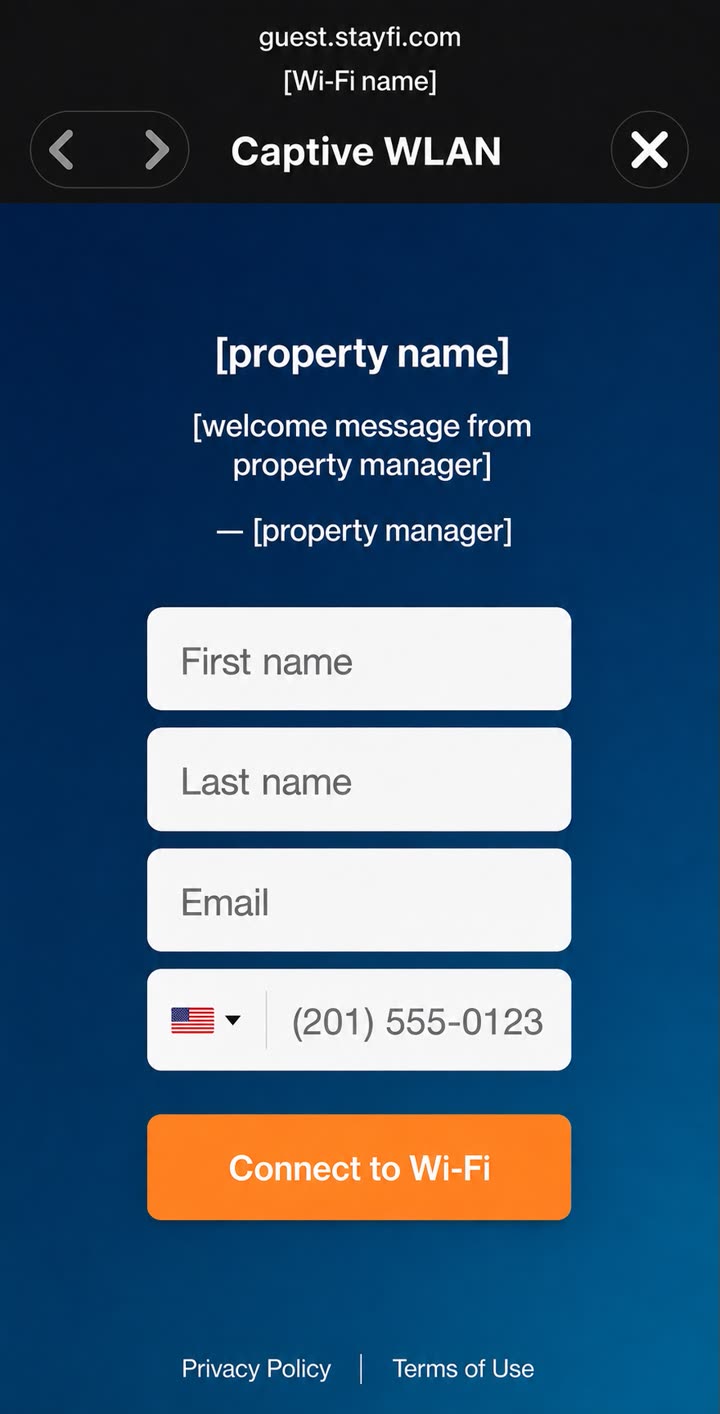
A reconstruction of the portal with the property name, Wi-Fi name, property manager’s name, welcome message, and location-specific background replaced.
This immediately caught my eye. Captive portals are common at hotels or on open networks, but I had not expected one at this vacation rental after entering the Wi-Fi password. So I decided to find out what was going on.
Starting with the Network
The captive portal pointed to guest.stayfi.com, and a quick Google search led me to the StayFi home page which describes the product as “WiFi & Guest Marketing Built For Vacation Rentals.” This looked interesting, though it was not immediately clear how it worked.
I asked an AI agent to map out the network topology, and it ran a few quick commands:
route -n get default
scutil --dns
arp -an
I initially assumed the captive portal was implemented by the gateway, but these commands quickly showed that the gateway and DNS server were two different hosts:
default gateway:  192.168.x.1
DNS server:       192.168.x.y

ARP entry for gateway:  78:45:58:xx:xx:xx
ARP entry for DNS:      88:a2:9e:yy:yy:yy
The DNS server’s MAC prefix, 88:a2:9e, pointed to Raspberry Pi hardware. Conveniently, the StayFi Express webpage includes a photo of the device, and it is unmistakably a Raspberry Pi. The setup guide also lists configuring custom DNS as part of installation.
This also explains how the StayFi device can trigger the captive portal. As the DNS server, it can direct queries such as captive.apple.com to itself. Its local HTTP server then redirects the browser to the remote StayFi portal shown earlier. If you submit the requested information, StayFi authorizes your device for Internet access.
At this point, several possible bypasses came to mind. We could try a different DNS server, such as 1.1.1.1 or 8.8.8.8, or perhaps connect through our own VPN. For the latter, we might need to know the VPN’s IP in advance. I manually changed the DNS server and the bypass worked on this network, but I still wanted to see exactly how StayFi works.
Imaging the Device
I decided to dig deeper. The operating system lives on an easily removable SD card (thanks, Raspberry Pi!), so I dumped a full disk image of it:
sudo dd if=/dev/rdisk8 \
  of=stayfi-express.img \
  bs=8m conv=noerror,sync
The resulting image was about 30 GB, most of which was empty space. The layout uses an A/B update scheme: two root slots allow a new system image to be installed while retaining a known-good one for rollback. A persistent data partition provides an overlay for configuration, databases, logs, and credentials.
After unpacking everything, the root filesystem contained mostly recognizable Linux packages. The custom part was thankfully small: three stripped AArch64 ELF binaries all built with Go 1.22.5.
| Component | Size | Job |
|---|---|---|
dnsserver |
7.6 MB | Resolves DNS, associates requests with client MAC addresses, applies access policy, and logs queries |
httpserver |
7.2 MB | Redirects unauthenticated HTTP clients to the cloud portal and proxies selected traffic |
stayfi-agent |
7.7 MB | Handles configuration, telemetry, remote commands, and device state |
This is one reason appliance reversing can be fun: a multi-gigabyte filesystem often reduces to a few megabytes of code that actually answers your question. The remaining data is just Linux doing Linux things.
Reverse Engineering the Go Programs
Go binaries are large, but they are often generous to reverse engineers. Even in stripped executables, metadata such as .gopclntab can preserve package paths and function names. I asked my AI agent to recover those names and analyze the binaries with the help of Binary Ninja’s MCP server. The overall design became clear quickly.
The HTTP service uses Go’s standard net/http stack and net/http/httputil.ReverseProxy. The DNS service uses the well-known miekg/dns package. Both use SQLite for local state. Using existing protocol libraries meant I could focus my analysis on the policy wrapped around them.
In simplified Go-like pseudocode, the HTTP flow looked roughly like this:
clientMAC := macForIP(request.RemoteAddr)

if isAuthorized(clientMAC) {
    proxyRequest(request)
    return
}

if matchesSmartConnect(request.UserAgent) {
    go authorizeWithCloud(clientMAC)
    proxyRequest(request)
    return
}

redirectToCaptivePortal(clientMAC)
For each client request, the appliance maps the source IP address back to a MAC address using its ARP table, with arping as a fallback. The MAC address becomes the local identity. SQLite records whether that identity is authorized, blocked, or eligible for a bypass rule.
DNS and HTTP then cooperate as DNS applies the client’s policy and records the query. When an unauthenticated browser makes a plain HTTP request, the HTTP service sends a redirect resembling:
https://guest.stayfi.com/sbc/captive_portal?sbc_mac=<appliance>&client_mac=<guest>
Notice that this is no longer on the local device—the request goes to a remote server.
According to StayFi’s privacy policy (last updated July 31, 2025), StayFi may disclose personal information such as email addresses, device identifiers, phone numbers, and usage information to the property manager. It may also share information with advertising partners.
I even tried entering a syntactically valid but fake-looking email address. The webpage had no issue with it, but the server rejected it. StayFi’s setup documentation says its optional valid-email check uses ZeroBounce, which is consistent with the rejection I observed. That check validates an email address; it does not establish the identity of the person entering it.
A Serious Privacy Concern
A closer look at the DNS server showed that it logs requests to dnsserver.log. A Datadog agent tails this file, with a configuration to forward the DNS logs to that third-party service.
The log recovered from my device covered about three and a half hours. It contained 11,801 DNS-request records representing 639 unique domain names. Packet captures showed sustained connections to Datadog log-intake infrastructure, consistent with that configuration.
DNS logs show which domain names a device looked up and when. They can suggest which services it used, but background applications and prefetching also generate queries, so a lookup does not prove that a person visited a website. Because the registration form sends the guest’s name, email, phone number, client MAC address, appliance MAC address, and property identifiers, these records could be linked to an identified guest, although I found no evidence showing whether or how often StayFi performs that correlation.
The privacy policy also says that StayFi automatically collects “Usage Information” and a “Device Identifier,” including IP and MAC addresses. More directly, it says StayFi “collects your network traffic information.”
The policy says it will not use this information “for any purpose other than to administer the Services”—for example, to maintain and secure the network, answer service-related questions, or respond to legal requirements. Elsewhere, it describes sharing personal or usage information with the property manager, service providers working on StayFi’s behalf, and, in some circumstances, advertising partners.
If you find this a little confusing, I felt the same way. It’s difficult to tell how they actually handle the data.
Little Surprises
Finding unexpected details is one of the best parts of reverse engineering, and this device did not let me down. For example, it whitelists certain device names and MAC address ranges associated with smart TVs and other IoT devices. This makes sense because you obviously cannot type your phone number into a smart speaker.
The downloaded regular expressions matched terms including:
tv, smart-tv, hbbtv, Roku, Fire TV, Apple TV, Chromecast,
Tizen, webOS, Sonos, thermostat, door lock, Home Assistant,
Nest, PlayStation, Xbox
The MAC whitelist contained 285 organizationally unique identifiers (OUIs). These are three-byte vendor prefixes rather than complete device addresses. A few examples were:
| Vendor | Whitelisted prefixes |
|---|---|
| Vizio | 00:bd:3e, 0c:8b:7d, 3c:9b:d6, a0:6a:44 |
| Texas Instruments | 0c:1c:57, 10:08:2c, 6c:79:b8 |
| Ubiquiti | d0:21:f9 |
The device also comes with a WireGuard profile. A heavily redacted and abridged version looks like this:
# /etc/wireguard/wg-client.conf
[Interface]
PrivateKey = <redacted>
Address = 10.39.x.y/32

[Peer]
PublicKey = <redacted>
Endpoint = <redacted>:51820
AllowedIPs = 10.39.x.1/32, ..., 10.39.x.10/32
The narrow AllowedIPs means WireGuard routes traffic only to a small set of management hosts, not all of the appliance’s Internet traffic.
The root account also has six authorized SSH keys that appear to be associated with StayFi:
# /root/.ssh/authorized_keys
ssh-ed25519 <key-redacted> [email protected]
ssh-ed25519 <key-redacted> [email protected]
ssh-ed25519 <key-redacted> <name>@stayfi.com
ssh-ed25519 <key-redacted> <name>@stayfi.com
ssh-ed25519 <key-redacted> <name>@stayfi.com
ssh-ed25519 <key-redacted> <local-hostname>
This presumably allows StayFi operators to access the box remotely for tasks such as troubleshooting.
The next time a captive portal Wi-Fi asks for your phone number, maybe change your hostname to “tv” and see if you still get blocked!
Editor’s Note (Jordan here): Fun fact, we did in fact get a bunch of text spam after the offsite and have even had the system re-subscribe our number after we requested the office number be removed