Earlier this year, I showed how to break encrypted USB drives with time-travel debugging (slides) at RE//verse. After having a lot of recent success with AI-assisted reverse engineering and vulnerability research, I wanted to see how well AI could handle the same tasks.
The results exceeded my expectations. For one encrypted USB drive, the investigation uncovered a backdoor that let me decrypt files with alternative passwords. AI also reproduced my earlier research in seven minutes using static analysis. I tried it on two more USB-protection products I had not studied before, and it broke those too.
A copy-protected USB drive
The first drive was YutianDun (御天盾), sold by SecZure. It hides encrypted files from Windows Explorer and opens them through bundled readers that claim to block copying, screenshots, and printing.
Fun fact: I had studied this drive before. In “Examining USB Copy Protection” in Paged Out!, issue 5 (November 2024), I showed that a DLL injected into its PDF reader process could read a protected file that another process could not read. That broke its copy protection.
I used time-travel debugging (TTD) with the help of AI to analyze it. The TTD trace revealed that the software hooks NtCreateFile and NtReadFile inside the PDF reader, supplying decrypted data. My injected DLL ran inside the same process, so it could transparently read the decrypted bytes, even though I did not know the exact mechanism back then.
The cryptosystem at a glance
This time, I decided to examine the security of its cryptosystem. Simply put, the Administrator password is hashed, and the hash is used to unwrap a value the code calls an “identifier.” The identifier is then used to derive the AES key that encrypts the file bytes. In simplified pseudocode:
credential = MD5(b"[SECZURE]" + password).hexdigest().upper().encode("ascii")
wrap_key = HMAC_MD5(credential, credential).hexdigest().upper()[:16].encode("ascii")
identifier = AES_128_ECB_decrypt(wrap_key, hex_decode(administrator_record.wrapped_identifier)).rstrip(b"\0")
file_key = HMAC_MD5(identifier, identifier).hexdigest().upper()[:16].encode("ascii")
plaintext = AES_128_ECB_decrypt(file_key, ciphertext)
There are a few obvious weaknesses. First, it uses fast MD5/HMAC-MD5, not PBKDF2. Second, taking 16 hex characters for each AES key limits it to at most 64 bits of entropy. But brute-forcing 2^64 possibilities is still impractical. So far, the encryption appeared to be secure.
Other mysterious users
Upon closer examination of the trace, I noticed a backend login as Buffer using the password 123456 before I typed in the Administrator password. This account is hidden from the user-management screen. Its record holds some bookkeeping fields, but I did not dig into the account’s exact purpose.
More importantly, its record contains another wrapped copy of the same content identifier, and its default password, as seen in the code, is 123456. I confirmed that I could unwrap Buffer’s identifier with 123456 and use the derived AES key to decrypt the files. Further code analysis revealed another built-in account, System, with the fixed password SECZURE.COM. On two tested drives, both accounts opened each drive’s identifier.
Administrator password ──→ Administrator's wrapped identifier ──┐
Buffer / 123456        ──→ Buffer's wrapped identifier        ──┼─→ content identifier → AES file key
System / SECZURE.COM   ──→ System's wrapped identifier        ──┘
I call this a backdoor from a technical perspective: the fixed passwords decrypt files without the user’s password. That does not imply malicious intent. However, it points to a problem with opaque crypto products: a backdoor can be hard to detect, even when the main cryptosystem appears secure.
Breaking NetacFileLock again
I started with NetacFileLock, which I had previously analyzed using time-travel debugging (TTD) to trace the ciphertext back to its AES key. I only did one prompt:
This is a file encryption utility. Analyze its crypto system and see if it is secure. You can use Binary Ninja MCP to help you.
Within seven minutes, Codex reached the main flaw: the program initialized AES-256 with a fixed 32-byte key embedded in the executable. The user password was checked separately and did not determine the encryption key. This means anyone can decrypt the file without knowing the user password.
During those seven minutes, the agent also made the following findings, some of which were not discussed in my talk:
- NetacFileLock wrote the user’s password into diagnostic logs.
- It encrypted independent 16-byte blocks without an IV or chaining, giving it ECB-style behavior.
- It used MD5 for password verification.
- It used an unkeyed MD5 digest as a file “signature.”
- Its SM4 option used another fixed key.
One open question in my research was why only one-third of my test file was encrypted. That is now solved too: the behavior is not limited to PDF files; it applies to any file over 1,024 bytes when fast mode is enabled. Fast mode covers the following file formats:
PNG, JPEG, GIF, TIFF, DWG, PSD, PST, DBX, Office, MDB, WPD,
PDF, ZIP, RAR, WAV, AVI, RAM, RM, MPEG, MOV, ASF, and MIDI
I did not bother asking AI why anyone would choose to do this.
I had mixed feelings after this. On the one hand, I was surprised and even a bit worried that AI could do it so quickly. On the other hand, this is an excellent time to become much more productive with AI’s help.
KakaSoft USB Copy Protection
From there, I wanted to test AI against something new. After a little searching, I found a seemingly promising product category: “copy-protected” USB drives. The vendors claim that files copied onto these drives can be viewed only through their software and cannot be extracted from the device. I was immediately suspicious. If a client can display a file, it must decrypt that file; when the user controls the computer doing the decryption, preventing extraction is extremely difficult.
I started with KakaSoft USB Copy Protection 5.6.0.299. I was working on macOS, while the tool runs only on Windows. This was hardly a problem: I asked the AI to handle the installer and analyze the extracted Windows binaries.
The program offered three security strengths:
- Normal: “Hide and Lock Files.” This does not encrypt the file.
- High: “Scramble and encrypt file headers.” The program XORs at most the first 16,385 bytes with a byte-sized key derived from the password. There are only 256 possible keys, known file signatures reveal the key immediately, and everything after the scrambled prefix remains plaintext.
- Highest: “256-bit Blowfish Encryption.” This was the safest-looking option and the one I selected.
The first two were obviously insecure. What caught my eye was the AI’s suggestion that it might recover a file encrypted at the Highest level without the password. When I asked for details, however, it appeared uncertain.
To confirm the weakness, I ran the software and let it protect a small text file. When I inserted the protected drive, it appeared to contain only USBCopyProtect.exe, which was required to view the file.

This did not bother the AI. It first located the protected data, which KakaSoft had hidden inside an unusual directory tree on the exFAT volume. Parsing the raw directory entries produced this tree:
USB root
└── HPSafeBox                              [hidden + system]
    ├── desktop.ini                        [hidden + system]
    ├── con.{d3e34b21-9d75-101a-8c3d-00aa001a1652}
    └── Important Folder
        └── Com1.{d3e34b21-9d75-101a-8c3d-00aa001a1652}
            └── \x7f\x7f\uE347..           [unusual UTF-16 name]
                ├── Info.bd
                ├── Daily.db
                └── NLLastF                [hidden + system]
                    └── test.txt.txt        [667 bytes]
HPSafeBox and NLLastF had the exFAT hidden and system attributes. The Com1.{...} component combines the reserved Windows device name COM1 with a shell CLSID-style suffix. The next directory’s on-disk name begins with two 0x7f DEL characters, followed by the private-use Unicode character U+E347 and two dots. These names confuse normal Windows path handling and help keep the tree out of Explorer.
Here is a shortened hexdump of the hidden 667-byte test.txt.txt:
00000000: a0 ea 96 ca 0e 03 f0 98 0b 3e ad 18 99 a7 e3 9d  .........>......
00000010: 08 b2 f6 55 b7 2f 47 3c 0e 66 2b a9 1f 82 97 c8  ...U./G<.f+.....
00000020: b5 47 c4 22 09 08 30 2c 7a 65 9b b8 b3 1e 87 25  .G."..0,ze.....%
00000030: 45 35 49 a4 58 1c 63 5b 4e e3 ee 0a 05 48 b3 56  E5I.X.c[N....H.V
...
00000250: 20 32 34 31 38 35 36 35 37 33 31 34 32 41 44 38   241856573142AD8
00000260: 38 32 30 36 43 45 31 42 46 38 33 35 46 41 38 46  8206CE1BF835FA8F
00000270: 37 00 00 00 00 00 00 00 00 00 00 00 00 00 00 00  7...............
00000280: 00 00 00 0e 6b 61 6b 61 65 6e 63 72 79 70 74 69  ....kakaencrypti
00000290: 6f 6e 08 42 6c 6f 77 46 69 73 68                 on.BlowFish
The first eight bytes are a random salt, the next eight are the Blowfish CBC IV, and the ciphertext begins at offset 0x10. The final 75 bytes start at 0x250. This trailer contains a 32-character verifier followed by the readable strings kakaencryption and BlowFish:
8-byte salt | 8-byte IV | Blowfish ciphertext | 75-byte trailer
The client was a 32-bit Delphi program. The AI followed its TBlowfishEncryption class to learn how those bytes were decrypted. Each file had its own salt and IV. The fatal problem was how the key was derived:
internal password = modified MD5 of an embedded seed
file key          = RIPEMD-128(salt || internal password)
plaintext         = Blowfish-CBC-Decrypt(file key, IV, ciphertext)
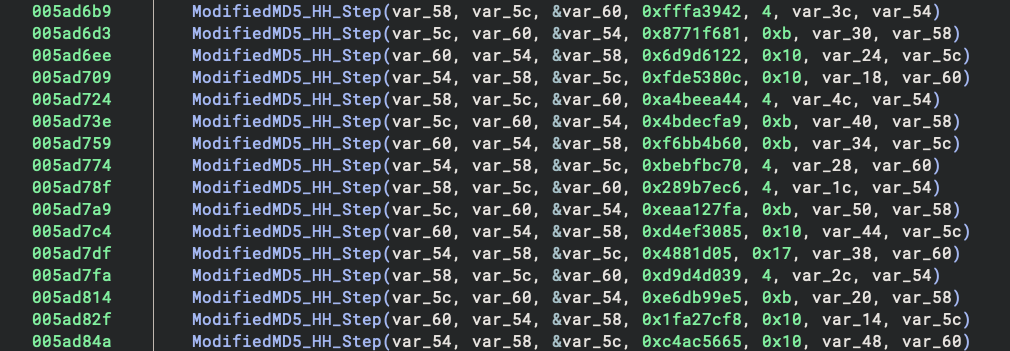
The first hash was recognizably based on MD5, but it was not standard MD5. Here are the first eight operations of the third round in a vanilla implementation:
HH(a, b, c, d, x[ 5],  4, 0xfffa3942);
HH(d, a, b, c, x[ 8], 11, 0x8771f681);
HH(c, d, a, b, x[11], 16, 0x6d9d6122);
HH(b, c, d, a, x[14], 23, 0xfde5380c);
HH(a, b, c, d, x[ 1],  4, 0xa4beea44);
HH(d, a, b, c, x[ 4], 11, 0x4bdecfa9);
HH(c, d, a, b, x[ 7], 16, 0xf6bb4b60);
HH(b, c, d, a, x[10], 23, 0xbebfbc70);
The rotation counts repeat 4, 11, 16, 23. KakaSoft kept the same constants and message order, but its corresponding calls use 4, 11, 16, 16, 4, 11, 11, 4. The changed arguments are visible in the decompiled client:
Vanilla digest rendering normally looks like this:
static const char hex[] = "0123456789ABCDEF";
out[i * 2]     = hex[digest[i] >> 4];
out[i * 2 + 1] = hex[digest[i] & 0x0f];
KakaSoft performs the same lookup with 1903642857ACBEDF instead:

This second change is only character substitution; the altered rotations are what make the raw digest differ from standard MD5.
Rather than reimplementing this custom hash by hand, the AI emulated the relevant code in the client and produced the fixed internal password:
AEF33093...DA1E
With this value, it decrypted the file with Blowfish and restored its original bytes. In other words, the product not only failed to prevent copying; its files could be recovered without knowing the password.
The static work took about two minutes to unpack the installer and another seven minutes to analyze its cryptography, requiring two prompts from me. Once I supplied the protected drive, the AI needed about 26 minutes and six short prompts–mostly confirmations about the mounted drive, test password, and analysis direction–to extract the hidden file, recover KakaSoft’s modified MD5 construction, and prove passwordless decryption.
Nexcopy
The second new target was Nexcopy Copy Secure, provisioned with Drive Wizard 1.0.81. The drive included both Windows and macOS viewers. The Mac viewer retained useful Objective-C method names, making its design particularly easy to follow.
After plugging the protected drive into my Mac, those two viewers were all Finder showed:

The protected content was encrypted this time with three-key Triple-DES in CBC mode. The problem was again how the key was stored.
The drive contained an encrypted configuration file. The viewer opened it with this fixed 32-byte certificate embedded in the application:
83E89F19...A56F
Both the 324-byte configuration and the 140-byte protected test.txt began with the same 36-byte ASCII marker. Here is the complete encrypted test.txt container:
00000000: 31 42 46 37 41 38 41 30 2d 36 45 42 46 2d 34 36  1BF7A8A0-6EBF-46
00000010: 42 38 2d 38 46 31 44 2d 35 35 41 44 42 36 41 46  B8-8F1D-55ADB6AF
00000020: 42 35 44 32 3b 2f 7e af c0 8f 84 c4 7f 45 fc d6  B5D2;/~......E..
00000030: f8 68 27 bc 73 7a 3b 7a 33 c7 9e f0 46 da 70 04  .h'.sz;z3...F.p.
00000040: 53 44 46 4e 61 aa ea b9 aa d4 75 19 e8 32 b7 06  SDFNa.....u..2..
00000050: 29 d0 3c f8 04 d7 af da c3 ab ae 46 87 a1 68 fd  ).<........F..h.
00000060: 1e 9c 04 18 3c be 27 51 72 82 de 8b 5d 5c 49 98  ....<.'Qr...]\I.
00000070: c3 97 97 91 d0 10 b0 01 e1 1c 38 49 9a fc e2 6b  ..........8I...k
00000080: 72 8d 45 8b 58 48 8f e6 9b 4f f6 02              r.E.XH...O..
The first 36 bytes are the marker; the remaining 104 bytes are padded 3DES-CBC ciphertext. The encrypted configuration used the same marker followed by 288 ciphertext bytes. Decrypting it with the embedded certificate produced:
vid=FA6E
pid="8598"
prefix="7015A1496E"
error_msg="Please contact [company information here] for an XXXXXXX."
key="6CF96891F31A329CED2B33171D6518740AD1212B687CDACE892962F7C59F7172"
password="123456"
start=\Mac Viewer.app\Data
The key field was the content certificate: a 24-byte 3DES key followed by an 8-byte IV. The password was a separate UI setting.
fixed value in viewer
        ↓
encrypted configuration
        ↓
content key + IV ──→ protected-file decryption
UI password       ──→ string comparison in the viewer
USB identifiers   ──→ software device check
The password and device checks only controlled whether the official viewer continued. They were not inputs to the file key. In fact, the Mac viewer retrieved the stored password and compared it directly with the entered text using isEqualToString:.
With the content key and IV, the AI decrypted the ciphertext and restored its original contents.
Nexcopy also attempted to enforce copy protection in the viewers. The code enumerated processes, intercepted screenshot-related keys, used clipboard APIs, and looked for applications such as ScreenFlow, Camtasia, Debut, Grab, and QuickTime. Those checks may discourage casual copying, but they do not protect the content key from someone who can inspect the viewer and reproduce its decryption.
Altogether, the AI took about ten minutes and five prompts from me to unpack the installer, trace the cryptography, and identify the key-management failure.
Conclusion
I did not follow the conventional coordinated disclosure process for these bugs. If an adversary already has a device, it cannot be recalled or updated easily. I am publishing these findings directly so potential users know about these limitations and understand that their passwords may not protect their files.
AI is improving rapidly, and in my experience, it has already accelerated reverse engineering and vulnerability research significantly. These examples show that, with minimal prompting, AI can independently produce valuable research results in remarkably little time. I am especially impressed by how quickly it locates the relevant code—a task that often consumes a substantial part of a human reverse engineer’s time.
If you have not tried this workflow, you should. One easy way to get started is to download Binary Ninja Free and set up its MCP server—or ask your AI agent to do it for you!